

For years, WPA2 has been the security standard used to protect Wi-Fi connections. However, with the evolution of cyber-attacks and the flaws discovered over time, it became urgent to improve the protection of wireless networks. It was against this backdrop that WPA3 was developed. But what does it really do that’s new? And how is it more secure than its predecessor? This article tells you all about WPA3, its improvements and what it means for users and businesses.
In this article
Everything that changes with WPA3: Security, encryption and compatibility
Today, Wi-Fi is an essential standard for device connectivity in both domestic and professional environments. However, the security of these networks has long relied on protocols that have shown their limitations in the face of evolving cyberthreats.
The WPA2 (Wi-Fi Protected Access 2) protocol, introduced in 2004 as the successor to WPA and WEP, represented a significant advance in wireless communications protection. It relies primarily on AES (Advanced Encryption Standard) encryption and authentication via a pre-shared key (PSK) or an enterprise RADIUS server (WPA2-Enterprise). However, despite these improvements, several critical vulnerabilities have come to light over the years. WPA2’s main vulnerabilities include :
- KRACK (Key Reinstallation Attack, 2017): this attack revealed a weakness in WPA2’s four-stage key exchange process, enabling an attacker to decrypt communications and potentially inject malicious code.
- Brute-force and dictionary attacks: weak passwords are a major vulnerability. An attacker can capture a WPA2 handshake and attempt to decrypt it using brute-force attacks.
Faced with these persistent threats, it became clear that a new Wi-Fi security standard was needed. It was against this backdrop that WPA3 was introduced, aimed at strengthening the security of wireless connections and filling the gaps left by WPA2.
WPA3’s new features
One of the main aims of WPA3 is to provide better protection for Wi-Fi connections, whether personal or professional. Unlike WPA2, where an attacker could exploit certain flaws in the authentication protocol (notably via the KRACK attack on the four-step handshake), WPA3 introduces improved mechanisms to guarantee robust security.
| Functionality | WPA2 | WPA3 |
|---|---|---|
| Authentication type | PSK (Pre-Shared Key) | SAE (Simultaneous Authentication of Equals) |
| Data protection | Global encryption | Individual encryption |
| Open network security | Low | Strong (OWE) |
| Resistance to brute-force attacks | Low | High |
Exchanges between a client and an access point are better protected thanks to stronger encryption algorithms and authentication methods that are more resistant to attack. This enhanced security concerns both individual users and companies seeking to improve their network’s protection against intrusions.
Protection against brute-force attacks (Simultaneous Authentication of Equals)
One of the main vulnerabilities of WPA2-PSK is its susceptibility to brute force and dictionary attacks. An attacker could capture a WPA2 handshake and attempt to crack the password via an offline attack, testing millions of combinations.
In response to this flaw, WPA3 replaces the PSK (Pre-Shared Key) protocol with SAE (Simultaneous Authentication of Equals). This new authentication method offers several advantages:
- Resistance to offline attacks: unlike WPA2-PSK, an attacker can no longer capture the handshake and attempt to crack the password offline. Any attack attempt must now be carried out in real time, which greatly complicates the process.
- Improved password security: even if a user chooses a relatively simple password, SAE considerably reduces the risk of exploitation.
- Secure key exchange: the authentication process is strengthened to prevent KRACK-type vulnerabilities.
With SAE, Wi-Fi connections become more resistant to cyber-attacks, even when weak passwords are used.
Individual session encryption (Opportunistic Wireless Encryption)
In open WPA2 networks (such as those in cafés, hotels or airports), the data exchanged between a user and an access point is not encrypted, making these connections extremely vulnerable to interception and Man-in-the-Middle (MITM) attacks.
WPA3 addresses this problem by introducing Opportunistic Wireless Encryption (OWE), a technology for individualized session encryption on open networks. The advantages of OWE are:
- Automatic data encryption between user and access point, even without a password.
- Protection against passive eavesdropping: an attacker can no longer easily intercept the communications of a user connected to a public network.
- Security with no impact on the user experience: OWE is transparent and requires no additional action on the part of the user.
Thanks to this technology, open Wi-Fi connections become much more secure, protecting user data against espionage and malicious attacks.
How do you activate WPA3 in your router’s Wi-Fi settings?
Once your router has been updated, you must activate WPA3 in your network’s advanced settings:
- Access your router’s Wi-Fi settings.
- Look for the section on network security.
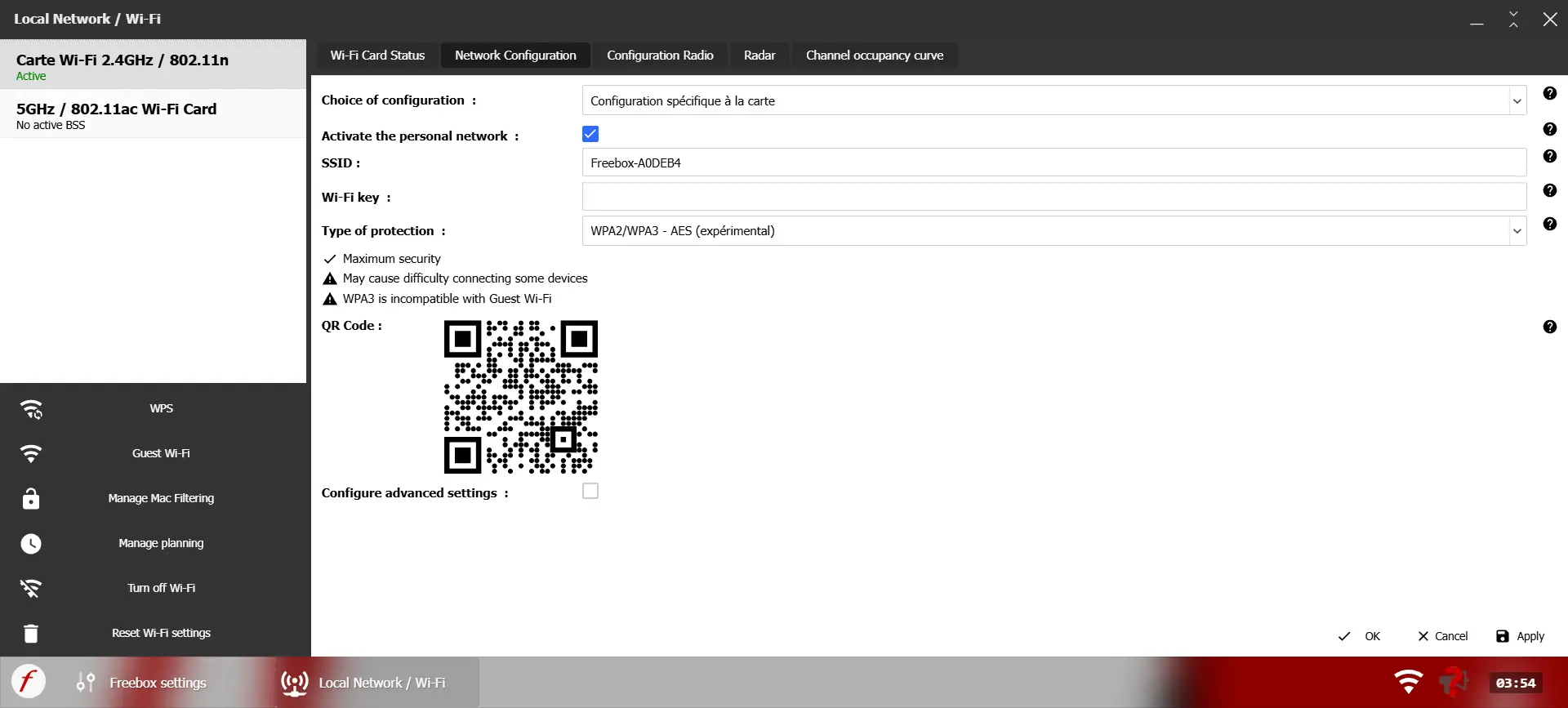
- Select WPA3 if all your devices are compatible.
- If you have older devices, enable WPA3/WPA2 transition mode to ensure compatibility with older equipment.
⚠️ Enabling WPA3 on your Wi-Fi network greatly enhances security, but may lead to compatibility problems with some older devices.
We allow some readers to view our articles for free with an ad blocker. However, their number is currently too high for us to keep this access available to everyone.
You can disable your ad blocker to continue reading immediately, subscribe to enjoy all our content without ads, or come back a little later when the pressure has eased.
Access will be restored automatically as soon as the situation allows.