

Wi-Fi USB sticks are super handy in case the network card is out of order, or if you want to upgrade the Wi-Fi power of an old computer. In this article, we’ve selected the best Wi-Fi sticks available in 2026.
The best Wi-Fi USB flash drives in 2026
1. Archer TXE70UH: the TP-Link 6E tri-band Wi-Fi key
The TP-Link Archer TXE70UH is a top-of-the-range USB 3.0 Wi-Fi key designed to deliver exceptional performance thanks to the tri-band Wi-Fi 6E standard. It uses the 2.4 GHz, 5 GHz and, above all, the new, much less saturated 6 GHz bands, enabling data rates of up to 5400 Mbps in optimal conditions. Its high-gain dual external antenna ensures excellent connection stability, even in complex environments or those far from the router.
Compatible with Windows 10 and 11 (64-bit), this key is easy to install and supports the latest network technologies such as OFDMA, MU-MIMO, Beamforming and WPA3, enhancing both the fluidity and security of connections. Its remote cradle with USB cable enables optimal placement on a desk, further enhancing signal reception. Whether for telecommuting, 4K streaming or online gaming, it meets the requirements of advanced users.
To fully exploit the potential of this key, a Wi-Fi 6E router is essential.

Highlights :
Drawbacks :
Buy at the Best Price on Amazon
2. Nighthawk A8000: the USB Wi-Fi key for gaming
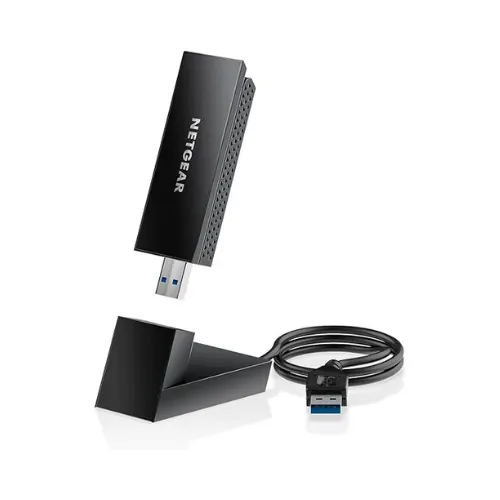
The NETGEAR Nighthawk USB Key (A8000) is a high-performance 6E WiFi key designed to provide a fast, reliable wireless connection to your compatible devices. It uses WiFi 6E (802.11ax) technology, which adds a new 6 GHz frequency band to the existing 2.4 GHz and 5 GHz, enabling speeds of up to 3 Gbps and reducing interference.
Designed for intensive use, it easily meets the demands of competitive online gaming, UHD/4K streaming and very high-speed heavy file transfers.
In terms of security, the A8000 adopts the new WPA3 Wi-Fi standard, guaranteeing enhanced protection for your connections and personal data. Easy to install thanks to a clear interface and simplified configuration system, it also boasts a compact, mobile format, ideal for accompanying a laptop or desktop PC.
Highlights :
Drawbacks :
Buy at the Best Price on Amazon
3. TP-Link Archer TX20U Nano, Wi-Fi 6 in miniature format
The TP-Link Archer TX20U Nano is a miniature Wi-Fi 6 adapter designed to enhance a computer’s wireless connectivity without cluttering up its USB port. Its ultra-compact size allows it to remain permanently connected like a simple USB key, while bringing the benefits of the latest Wi-Fi standards. Compatible with the 2.4 GHz and 5 GHz bands, it ensures a stable, fast connection, even in environments where several devices share the network.
Designed for Windows 10 and 11 users, it installs in seconds and takes full advantage of Wi-Fi 6’s advanced features. Speeds of up to 1201 Mb/s at 5 GHz are more than sufficient for streaming, online gaming and large file transfers. Compatibility with WPA3 encryption enhances network security, an important asset for both professional and domestic use.
Discreet, reliable and economical, the Archer TX20U Nano is a good upgrade for modernizing a PC without dismantling it. Its USB 2.0 port slightly limits maximum performance, but the overall package remains coherent for everyday use. Compact and robust, it offers a successful balance between ease of installation, signal stability and connection security.

Highlights :
Drawbacks :
Buy at the Best Price on Amazon
4. TP-Link Archer T3U Plus: the low-cost, high-performance Wi-Fi key
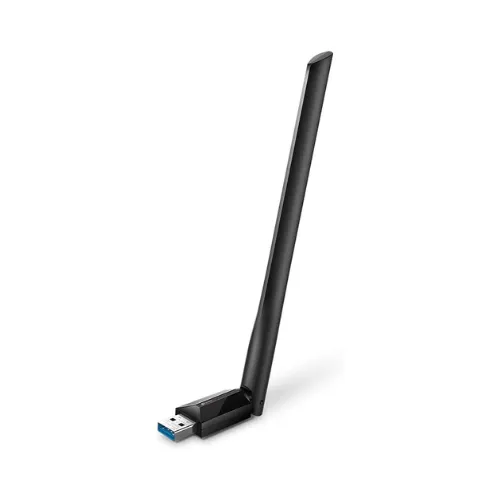
The TP-Link Archer T3U Plus is a dual-band WiFi USB adapter that offers high speeds and stable connectivity thanks to WiFi 5 (802.11ac) technology. It supports the 2.4 GHz and 5 GHz frequency bands, offering maximum speeds of 400 Mbps on the 2.4 GHz band and 867 Mbps on the 5 GHz band, perfect for HD streaming, online gaming and fast browsing.
Thanks to its two high-performance external antennas, the Archer T3U Plus improves signal reception and extends range, guaranteeing stable connections even at a distance from the router. The antenna is adjustable up to 180° for optimization in different environments.
Highlights :
Drawbacks :
Buy at the Best Price on Amazon
4. NETGEAR A6100-100PES: the USB key for office applications
The NETGEAR A6100-100PES is a compact WiFi stick designed to add a wireless connection to a desktop or laptop computer. Compatible with WiFi 5 (802.11ac), it offers connection speeds of up to 433 Mbps on the 5 GHz band and 150 Mbps on the 2.4 GHz band. These features make it an affordable option for light tasks such as web browsing, office work and streaming in standard quality.
Thanks to its compact, discreet design, it plugs easily into any USB 2.0 port. Beamforming+ technology improves signal stability and range by directing the WiFi stream to the connected device. Installation is simple thanks to Netgear Genie software, and the Push ‘N’ Connect button lets you quickly secure the connection without having to enter passwords.
How to enjoy Wi-Fi 6 without changing computer?
Wi-Fi 6 brings a real leap in performance in terms of speed, stability and energy efficiency. Even if your computer isn’t equipped with Wi-Fi, it’s possible to take advantage of it without replacing it. The trick is to add an external adapter, a small USB key incorporating a chip compatible with the Wi-Fi 6 standard. Once plugged in, it enables your PC to communicate with a modern router.
This solution instantly transforms an older PC into a device compatible with the latest networks. It offers higher speeds, better management of multiple connections and enhanced security thanks to WPA3. A simple accessory is all it takes to give your wireless connection a new lease of life, without the need for any internal hardware changes.
How to choose the right USB Wi-Fi key?
Buying a Wi-Fi dongle may seem complex when you learn all the terms associated with wireless networking, but this little device is actually very simple to use. It plugs into a USB port on a computer without a wireless network card, then connects to the Internet without the need for an Ethernet cable. The fact that it’s often referred to as a Wi-Fi dongle or adapter is simply a question of vocabulary: they all refer to the same practical tool for accessing a Wi-Fi network.
Wi-Fi 5, Wi-Fi 6 or Wi-Fi 6E: which standard to choose?
For everyday use, it’s important to check compatibility with your Internet box and the Wi-Fi standards supported by the key. Recent standards such as Wi-Fi 6 offer higher theoretical speeds, and can be dual-banded to connect on several frequencies (2.4 GHz and 5 GHz or 6GHz). This feature reduces interference and improves speed, which is particularly useful for streaming or online gaming.
Secure your connection with a USB Wi-Fi key
The question of security is also essential. USB Wi-Fi keys support various encryption protocols (WEP, WPA, WPA3 to secure your connection). Before connecting, remember to take note of your network’s SSID and enter the appropriate security key. Some boxes offer the WPS option: simply press the WPS button on the box and then the button on the Wi-Fi key to establish a wireless connection in just a few seconds.
If the range of the Wi-Fi signal is not satisfactory, a Wi-Fi amplifier or repeater may be considered to extend coverage. Alternatively, a key fitted with a more powerful Wi-Fi antenna can be used to gain better coverage of the home network. Installation is generally automated thanks to DHCP, which assigns an IP address to the computer without any advanced manipulation, and an administration interface can be accessed if you wish to configure connection sharing or filtering options.

