Ergonomics has become an essential criterion of well-being for users who spend long hours in front of a screen. Poor posture or prolonged use of a conventional mouse can lead to wrist, arm or shoulder pain, and even musculoskeletal disorders (MSDs). To avoid these inconveniences, ergonomic mice favor a more natural hand position and reduce muscular tension.
In 2026, the range of ergonomic mice on offer is more varied than ever, with models to suit every need: vertical mice, central mice, compact mice and trackballs. Whether you’re looking for a low-cost alternative or a high-performance mouse for intensive use, our comparison will help you choose the model that best suits your needs. Discover 2026’s best ergonomic mice, their advantages and features to enhance your comfort and productivity.
Our selection of the best ergonomic mice in 2026
| Rollermouse Pro3 | Logitech MX Vertical | Logitech Lift | |
|---|---|---|---|
| Image |
 |
 |
 |
| Infos : | Améliore la posture Barre roulante brevetée Huit boutons programmables Repose-poignets en mousse à mémoire de forme | Design ergonomique Capteur haute précision Réglage de la sensibilité Surface texturée et repose-pouce confortable | Souris verticale compacte Inclinaison ergonomique Revêtement en caoutchouc Boutons latéraux programmables |
| Acheter |
Rollermouse Pro3
Améliore la posture
Barre roulante brevetée
Huit boutons programmables
Repose-poignets en mousse à mémoire de forme
Logitech MX Vertical
Design ergonomique
Capteur haute précision
Réglage de la sensibilité
Surface texturée et repose-pouce confortable
Logitech Lift
Souris verticale compacte
Inclinaison ergonomique
Revêtement en caoutchouc
Boutons latéraux programmables
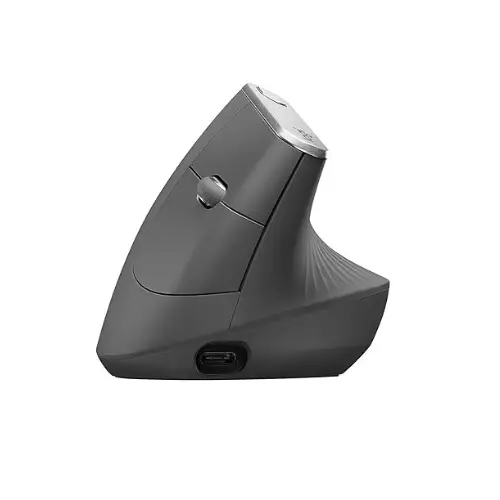
Logitech MX Vertical: The ergonomic mouse designed for comfort
The Logitech MX Vertical is an ergonomic mouse designed to reduce muscle fatigue and improve user comfort. Thanks to its 57° inclination, it allows a natural hand position, limiting pressure on the wrist and forearm. Its sculpted shape and textured surface ensure a pleasant grip for long work or navigation sessions.
Equipped with a high-precision 4000 PPP sensor, the MX Vertical reduces the movement required to move the cursor, thus reducing fatigue. A button instantly adjusts sensitivity for more precise control. It connects in three ways: via Bluetooth, the Logitech Unifying receiver or a USB-C cable, depending on user preference.
In terms of autonomy, its rechargeable battery provides up to four months of use, and a one-minute quick charge is enough for three hours of operation. Compatible with Windows, macOS, Linux, ChromeOS and iPadOS, MX Vertical adapts to a variety of business and personal environments.
Editor's Verdict :
Polyvalente et performante, elle constitue une excellente solution pour ceux cherchant une alternative ergonomique aux souris traditionnelles.
Buy at the Best Price on Amazon
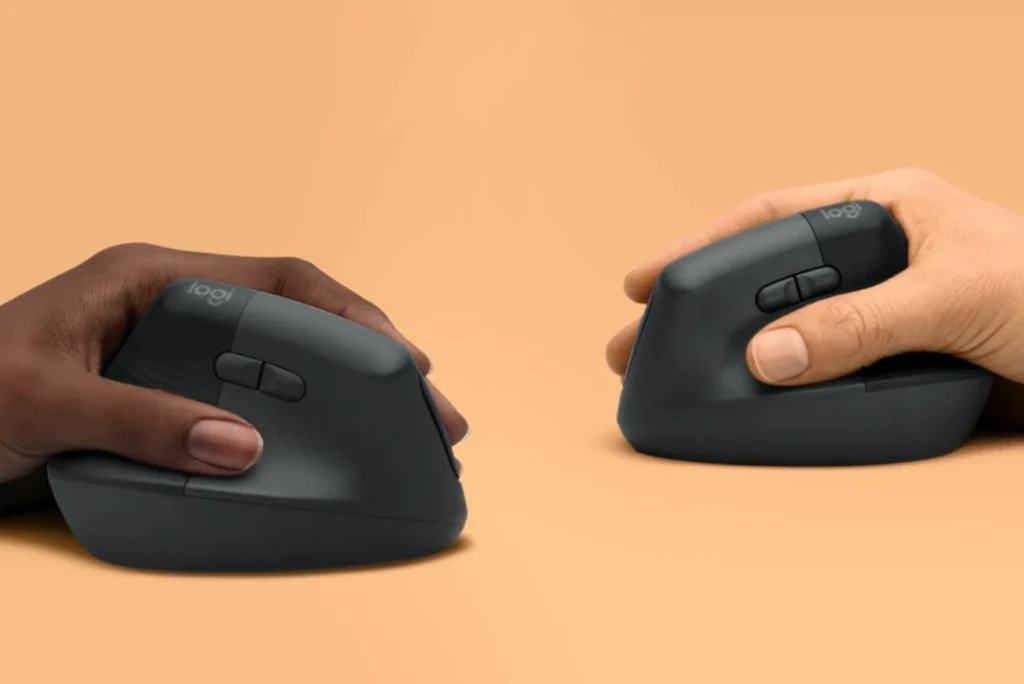
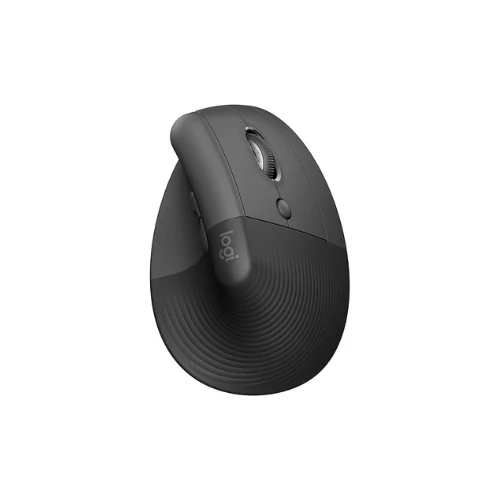
Logitech Lift: accessible ergonomics for pain-free working
Logitech Lift is an ergonomic vertical mouse designed to improve comfort for users with small to medium-sized hands. Its 57° inclination provides a natural grip, reducing pressure on the wrist and forearm. Its soft rubber coating and integrated thumb-rest provide a pleasant experience, ideal for prolonged fatigue-free use.
Compatible with Windows, macOS, Linux, ChromeOS and iPadOS, the Logitech Lift connects via Bluetooth or the Logi Bolt USB receiver. It features four customizable buttons, as well as a SmartWheel scroll wheel, allowing you to alternate between smooth and precise scrolling. A left-handed version is also available, making this model accessible to all.
Powered by an AA battery, it offers up to 24 months’ autonomy, reducing the need for frequent recharging.
Editor's Verdict :
Son design ergonomique et ses fonctionnalités intuitives en font une solution idéale pour améliorer la posture et réduire la fatigue musculaire au quotidien.
Buy at the Best Price on Amazon
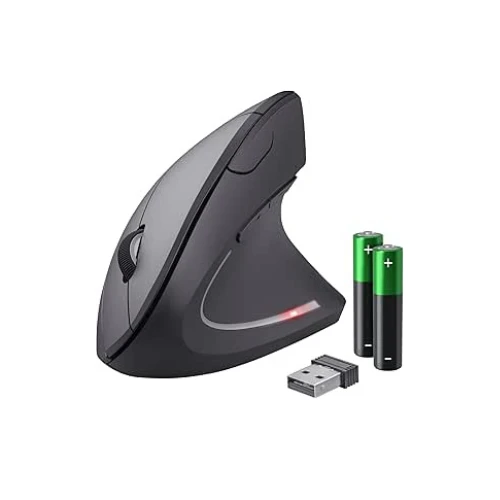
Trust Verto: A comfortable alternative to conventional mice
Trust Verto is an ergonomic vertical mouse designed to improve comfort of use by reducing strain on the wrist and forearm. Thanks to its 60° inclination, it favors a more natural hand position, minimizing fatigue during prolonged use. Its lightweight design and textured surface offer a pleasant grip, suitable for users looking for an alternative to conventional mice.
It features six buttons, including two on the side for easy navigation and a sensitivity adjustment knob (1000 to 1600 DPI), enabling you to adapt the precision of the cursor to your needs. Available in wired or wireless versions, it can be adapted to different work configurations. Its optical sensor guarantees responsiveness on most surfaces, while blue LED lighting adds a modern touch to its design.
Easy to install thanks to Plug & Play USB connectivity or via a wireless micro-receiver, Trust Verto is compatible with Windows and macOS.
Editor's Verdict :
Son rapport qualité-prix en fait une solution abordable pour ceux qui souhaitent adopter une ergonomie améliorée sans investir dans un modèle haut de gamme.
Buy at the Best Price on Amazon
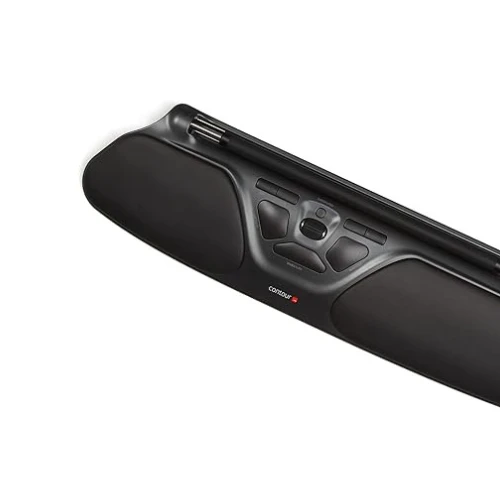
Contour Rollermouse Pro3
The Contour RollerMouse Pro3 is a central ergonomic mouse designed to reduce fatigue and improve comfort for users performing repetitive computer tasks. Placed in front of the keyboard, it eliminates the need to constantly move the hand towards a traditional mouse, promoting a more natural posture and reducing tension in the neck, shoulders and wrists. Its memory foam wrist rest provides optimum support for prolonged use without discomfort.
Featuring a patented rolling bar, the RollerMouse Pro3 offers precise cursor control with a fluidity of movement superior to that of a conventional mouse. It features eight programmable buttons, including practical shortcuts such as double-click, copy and paste, and offers adjustable sensitivity settings from 600 to 2400 DPI. Click strength can also be modified to suit user preferences, enhancing ergonomics and efficiency.
Compatible with Windows and macOS, the RollerMouse Pro3 connects via a USB-A or USB-C cable and requires no complex installation. By centralizing commands directly in front of the keyboard, it minimizes repetitive movements and helps prevent musculoskeletal disorders.
Editor's Verdict :
Idéale pour les professionnels travaillant de longues heures sur ordinateur, cette souris ergonomique est une solution efficace pour allier confort et productivité.
Buy at the Best Price on Amazon
How to choose the right ergonomic mouse for comfort at work?
Finding the ideal computer mouse will help you work comfortably and reduce the risk of carpal tunnel syndrome. For office use, it’s best to choose a mouse model adapted to your workstation, to reduce pressure on the wrist. You can opt for an optical mouse or a laser mouse, either wired or wireless, depending on your preferences. A good ergonomic mouse pad and wrist rest can also take the strain off your joints and improve your grip.
The shape of an ergonomic mouse
Mouse shape plays a key role in preventing carpal tunnel pain. Some are designed for right-handers, others for left-handers, while still others are ambidextrous. Logitech or microsoft mice, for example, offer several ergonomic mouse models with precise laser or optical sensors and a scroll wheel that’s easy to use. Also consider the position of the palm: a mouse with a vertical wire, a wider grip or an adjustable design can contribute to a more natural posture.
Your working environment must also be taken into account
Take your environment into account: do you work on a laptop, desktop or office computer? If you’re using a Mac, the Magic mouse may seem practical, but check its ergonomics for your hand. For a fast connection, opt for a USB mouse or Bluetooth mouse with nano dongle, easy to plug in via a USB port. You can also combine a keyboard-mouse (or wireless keyboard) to free up space and place your mouse as close as possible to the keyboard.
Finally, don’t forget that the way you use your mouse is just as important as its design. Take the time to adjust the height of the desk, the distance between your peripherals and the position of your right or left hand to relieve carpal joint strain. A trackball or simple touch pad may suit some, while a wired USB optical mouse remains a reliable choice for others. Whether for PC or Mac, the key is to buy an ergonomic mouse that fits your hand, improves glide and protects your health in the long term.
Did you find this article helpful?
Share it so others can benefit from it.
Learn more about the author