Not every single-board computer is designed for the same kind of project. Some are ideal for learning, experimenting and simple automation. Others are far better suited to a NAS, self-hosting or a compact homelab.
The problem is that many comparisons mix beginner-friendly boards with server-oriented models without clearly explaining who they are for. This selection keeps a clear top three in the comparison table, followed by two additional alternatives for more specific needs.
The best single-board computers for DIY projects
|
Raspberry Pi 5
|
ZimaBlade 7700
|
ZimaBoard 2 832
|
|---|---|---|

|

|

|
|
8 GB Kit Ultra-mature ecosystem Home Assistant / Linux / media center Great DIY entry point |
Compact x86 board PCIe x4 Network storage / personal server Good foundation for self-hosting |
Intel N150 8 GB LPDDR5 Dual 2.5 GbE PCIe 3.0 for homelab / NAS |
| 254,99 € | 210,99 € | View on Amazon |
If you would prefer a small computer that is ready to use, see our selection of the best desktop mini PCs.
Raspberry Pi 5: the best platform for getting started and going further
The Raspberry Pi 5 remains the easiest recommendation for anyone seeking a versatile, well-documented single-board computer that is still relevant for modern projects. The 8 GB version is much more comfortable for Home Assistant, Linux, a media center, programming or a lightweight personal server.
Its real strength comes not only from its specifications, but from everything around it: tutorials, accessories, cases, HATs, ready-to-use distributions and a huge community. That ecosystem makes it the best starting point for many DIY projects, even though other boards may be more powerful or specialized.
Highlights :
Drawbacks :
On Amazon right now:
If you want a board you can actually use without spending hours working around compatibility problems, the Raspberry Pi 5 still makes the most sense both for beginners and for building a stable long-term project.
ZimaBlade 7700: the most interesting x86 board for a small DIY server
The ZimaBlade 7700 is not a direct Raspberry Pi competitor in the traditional maker world. It is intended for users who want a compact x86 board for a personal server, network storage, a self-hosting machine or a media platform focused more on infrastructure than GPIO experimentation.
That is precisely its advantage: it moves beyond a conventional ARM SBC toward a server-oriented design, with better compatibility for some x86 software, a more natural approach to storage and genuine potential for a small personal lab without buying a complete mini PC.
Highlights :
Drawbacks :
On Amazon right now:
I would recommend it to someone who already knows they want to self-host, test services, build a small personal cloud or create a compact storage node. It is not the most natural choice for a purely electronic project, but it becomes much more relevant for a server project.
ZimaBoard 2 832: the best single-board computer for a serious NAS and homelab
The ZimaBoard 2 832 takes this server-oriented approach further. Its Intel N150, 8 GB of LPDDR5, PCIe 3.0 and, above all, dual 2.5 GbE ports make it a serious foundation for a home NAS, homelab, containers or a more ambitious network setup.
This is no longer just a small board for weekend experiments. It is a single-board machine with a real role in a denser home or technical setup. Compared with a Raspberry Pi, it is less universal for maker projects but much more focused on server and network uses.
Highlights :
Drawbacks :
On Amazon right now:
If your goal is to store data, host applications, run several services or build a compact but credible home lab, this is the most coherent option in the comparison.
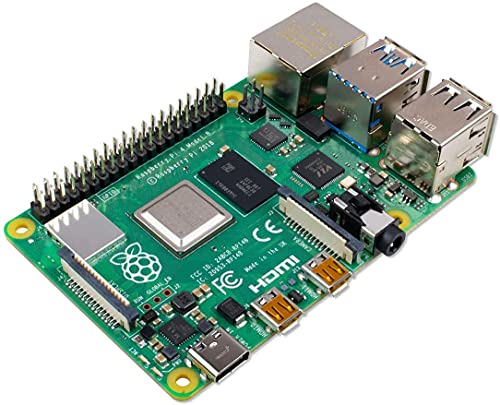
Raspberry Pi 4: the budget option for a simple project
The Raspberry Pi 4 is no longer the newest board, but it remains useful if you mainly need a compact, familiar and widely compatible platform for simple projects. It can still be more than sufficient for light home automation, a small media center, learning Linux or a discreet computer that runs continuously.
Its main advantage is a lower entry price while retaining the exceptionally well-documented Raspberry ecosystem. Just remember that the 2 GB version reaches its limits sooner when you add several services or a heavier environment.
Highlights :
Drawbacks :
On Amazon right now:
I mainly see it as a sensible budget choice when you already know the project will remain simple. If you are unsure and want more room to grow, the Raspberry Pi 5 is the safer option.
ZimaBoard 2 1664: the best upgrade if your homelab will grow quickly
The ZimaBoard 2 1664 follows the same approach as the 832 version but provides 16 GB of memory for users who already know they will combine many services, containers, storage tasks and network workloads. It is not necessary for everyone, but it is far more credible if you do not want to hit resource limits too quickly.
It is primarily aimed at homelab, NAS and self-hosting users who want a compact x86 platform with enough resources to last. The price is higher and needs to be justified, but the benefit becomes clear once the project grows beyond occasional experimentation.

Highlights :
Drawbacks :
On Amazon right now:
If you already know that you will host more than one or two small services, this better-equipped version is often more sensible than buying an undersized board that will soon need replacing.
How do you choose a good single-board computer?
Before buying, ask yourself one simple question: do you want a board for easy experimentation, or one for hosting services? A Raspberry Pi remains excellent for versatility, learning, home automation and simplicity. An x86 board such as a ZimaBlade or ZimaBoard becomes more attractive when storage, networking, services and a homelab are the priorities.
Then consider the criteria that genuinely matter: RAM, storage and expansion options, network connectivity, operating-system availability and the quality of the surrounding ecosystem. A powerful but poorly supported board can quickly become more frustrating than a slightly slower model with excellent documentation.