
Optimising disk space is one thing, but protecting your privacy is quite another. That’s exactly what Privazer is all about, a free utility whose mission is to track down and eradicate the slightest trace of your activity on your computer. I’ve downloaded, installed and configured this software to give you a full, unfiltered feedback report.
In this article
What is Privazer?
Privazer is a free privacy protection and deep cleaning tool for your PC. Unlike a simple optimization utility, its main objective is not necessarily to save you space (although it does that too), but to ensure that what you do on your PC remains confidential.
It scans your hard drive, external storage devices (USB sticks, external hard drives) and even your registry for residual traces:
- Browsing history and cookies
- Traces of software used and files recently opened
- Other deleted files still lying around in free sectors on your disk
In short, it’s a temporary file shredder.
Installing and getting to grips with Privazer Pro on Windows 11
To get started, download Privazer from the official website. There is a free version and a Pro version that unlocks features and automation. Installing Privazer is quick and particularly well thought out to suit all user profiles.
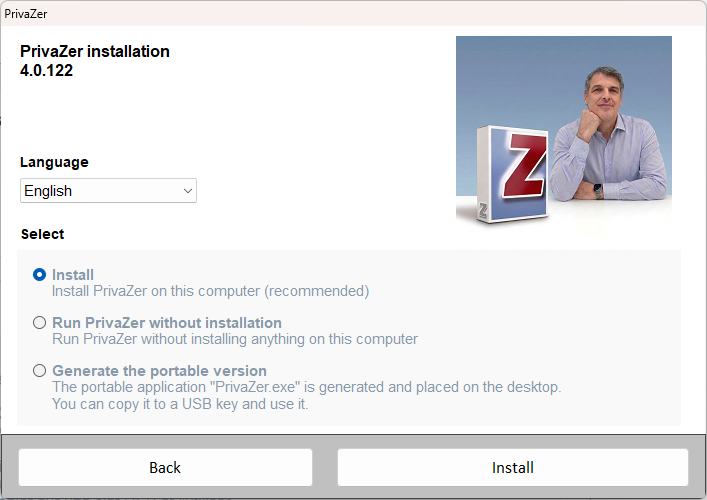
From the outset, the software gives you a choice between a traditional installation on your PC or the creation of a portable version (to be slipped onto a USB stick for cleaning other PCs).
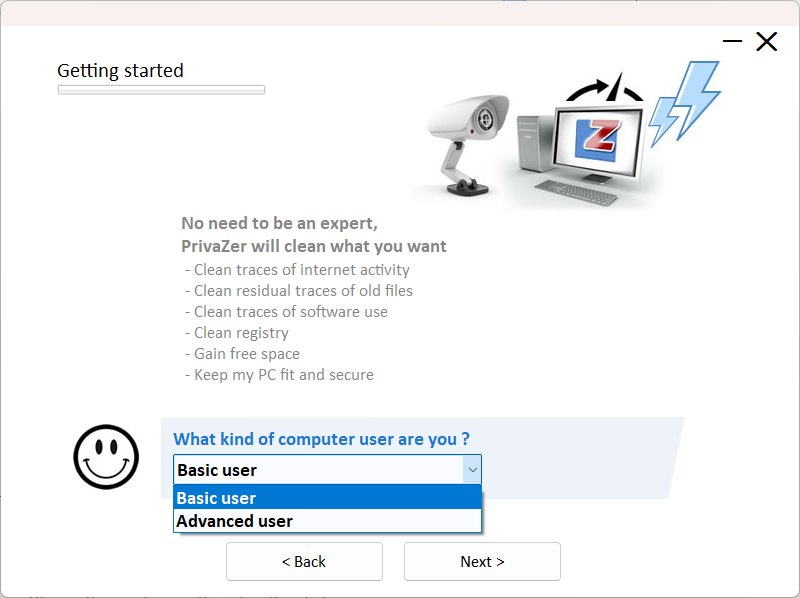
When you first launch Privazer, it takes the time to help you. A configuration wizard asks you what level of computer skills you have (Beginner or Advanced) so that the interface can be adapted to suit you.
Then it asks you a series of simple questions to find out exactly what you want to clean up or keep (web history, office software, image thumbnails, etc.).
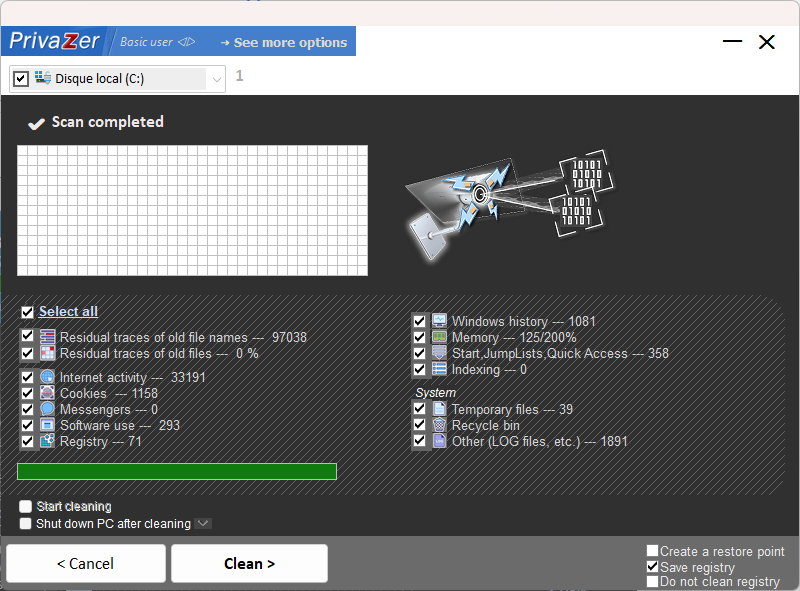
The interface may seem a little austere or busy at first, but it has the merit of being clear about what is being analysed.
A deep clean with data rewriting takes time. It takes much longer than simply emptying the recycle bin. Plan to leave your computer running for a while. Fortunately, Privazer makes the operation safer by offering to create a restore point and a registry backup before starting up.
Privazer is a privacy tool that removes all traces of your personal data.
It is common to confuse Privazer with the usual system cleaning software. Although some tools share some functions, there is a fundamental distinction between simple optimisation and genuine privacy protection.
Most maintenance software seeks above all to free up space on your disk by deleting temporary files. They simply delete the index of the file so that the system considers it deleted. However, the data is still physically present on the storage medium.
| What the tool does | Cleaning software | Privazer |
|---|---|---|
| Main purpose | Save disk space | Protect your privacy |
| Type of deletion | Quick and easy deletion | Secure deletion |
| Memory clean-up | Rarely supported | Memory cleaning |
| Data protection | Weak because traces remain | Traces disappear |
Privazer can use low-level erasure techniques to erase traces on the hard disk to counter this problem. It can rewrite zeros or random sequences on the exact sectors of the hard disk where your sensitive information was located.
It can make it impossible for professional recovery software to restore your documents. In addition, it can purge your system’s RAM. It can remove persistent traces left by your active applications. It can also ensure that no passwords or confidential data remain stored in RAM after your software has been closed.
PrivaZer automatically detects whether your storage medium is an SSD or a mechanical hard disk drive (HDD) and adapts its erasure algorithm. As soon as the analysis starts, the software identifies your hardware and adapts the command.
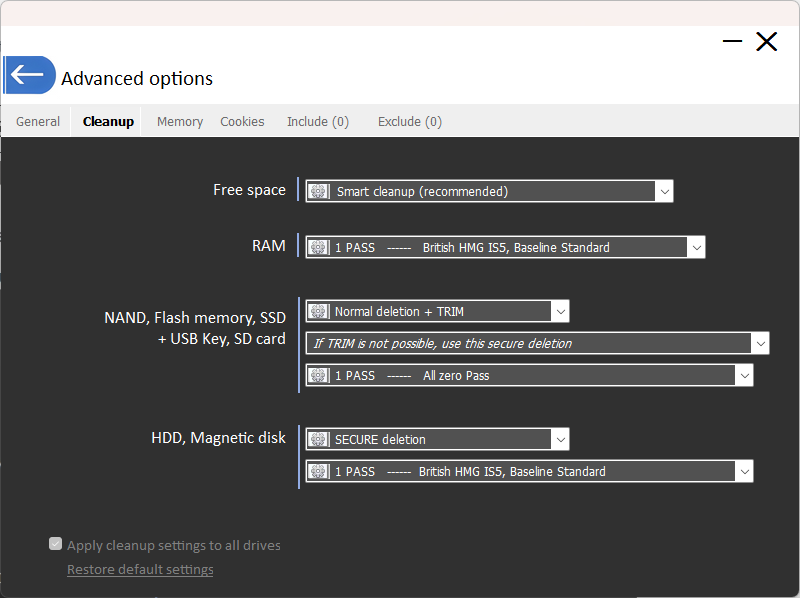
If PrivaZer detects an SSD, it uses the default TRIM command instead of treating the media as an HDD. This command tells your SSD controller which blocks of data are no longer needed and allows the drive to delete them naturally and in the background via its own rubbish collection process.
That’s why PrivaZer is both secure and optimised to preserve the health of SSDs.
Integrated Windows repair tools
In addition to its cleaning and confidentiality capabilities, Privazer includes a maintenance module to launch deep repairs in Windows, which usually require long command lines to be entered. This graphical interface allows you to run the DISM, SFC and chkdsk utilities without any prior technical skills.
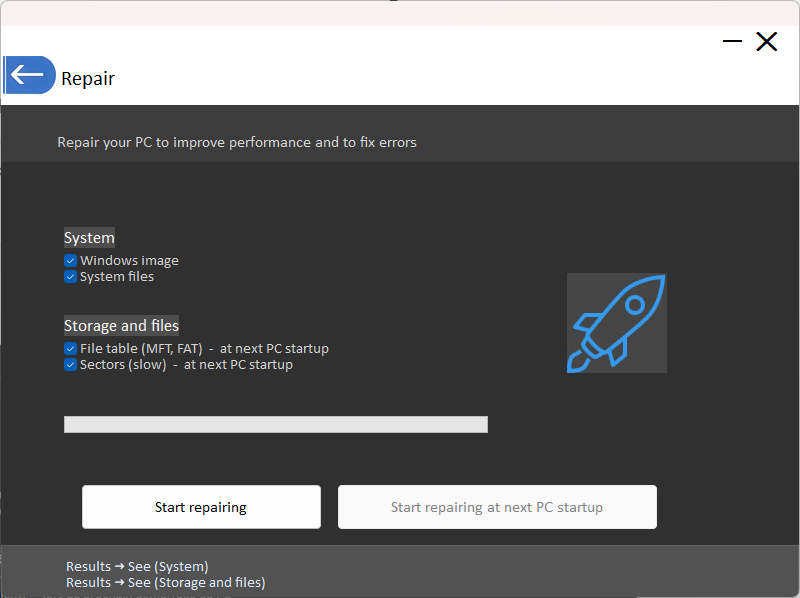
By activating this repair mode, the software automates a complete check of the Windows image and essential system files. If your computer suffers from unexplained slowdowns or bugs, this analysis can restore the corrupted elements. At the same time, Privazer can check the file table and examine disk sectors for anomalies. These time-consuming storage operations are programmed to run the next time your PC is started.
Data beyond the control of the application
However powerful it may be, Privazer comes up against an inescapable reality of the Cloud.
If you use browsers such as Google Chrome, Microsoft Edge or Firefox and you are logged in to your user account (Google account, Microsoft account), the game changes. Privazer will excel at cleaning up local traces on your hard drive. However, it has no power over remote servers.
- The problem of synchronisation: if your history, passwords and favourites are synchronised in the cloud, deleting them locally with Privazer will not delete them at Google or Microsoft.
- The next time you open your browser, it may automatically re-download this data from the cloud to your computer.
For more comprehensive protection, Privazer’s local action should be complemented by management of your online privacy settings (disable browser synchronisation, regularly purge your Google/Microsoft account via their respective dashboards).
My final verdict on this extreme cleaner
Privazer goes well beyond the stage of a simple optimisation application to become a genuine privacy shield. Its secure wiping approach and RAM clean-up clearly set it apart from its competitors. It’s a particularly relevant tool if you handle sensitive documents, share your PC or plan to resell your computer without the risk of seeing your old files resurface after formatting.
Its effectiveness does, however, require a modicum of common sense when it comes to use. Since deep cleanings place intensive demands on storage components, a monthly run is more than enough to prevent premature wear and tear on your disks. As long as you bear in mind its inability to purge data saved on your online accounts, this free programme is one of the most successful solutions for permanently erasing your digital footprints.