
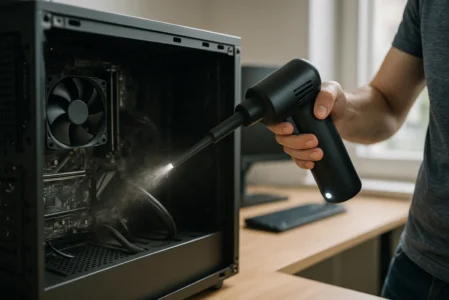
Compressed-air cans seem handy until you start cleaning computers on a regular basis. They run out quickly, lose pressure and need to be replaced all the time.
I’m a computer technician and I service over a hundred PCs every year. For over a year now, I’ve replaced the aerosol cans in my workshop with a rechargeable electric air blower. Having used it on desktop computers, laptops, keyboards and various pieces of electronic equipment, I can now give my verdict.
The leaf blower isn’t perfect and needs to be used with a few precautions. Nevertheless, it has cut down on my expenses, made cleaning easier and has definitely replaced the spray cans I used to buy.
Why did I stop using compressed-air spray cans?
For several years, I mainly used 400 ml dust-removing sprays. They were fine for removing a few crumbs from a keyboard or quickly clearing a ventilation grille, but were much less practical when dealing with a very dusty computer tower.

Highlights :
Drawbacks :
Buy at the Best Price on Amazon
The cylinder cooled rapidly during prolonged periods of pressure. The jet would then lose power, and it was necessary to pause the cleaning process for a few moments. An incorrect angle could also cause the gas to be sprayed in liquid form, resulting in a sudden cooling of the target surface.
Despite their common name, these products do not necessarily contain compressed air. The T’nB can I used, for example, contains butane pressurised to 5 bar.
For someone who dusts their computer once a year, this solution may be enough. In my line of work, however, the situation was different. I could go through a whole can in a week, and sometimes even more when several particularly grubby computer towers turned up at the workshop.
As I use several dozen cans a year, my expenditure was approaching €500. That figure may seem high, but it reflects professional use rather than that of a private individual who is simply maintaining their own computer.
A handy consumable that ends up costing a lot
Each purchase seemed harmless enough, but then the empty aerosol cans began to pile up in the workshop. A completely empty aerosol can may be placed in the bin provided for packaging. However, it must not be punctured or crushed.
Even when sorted correctly, the container is still a piece of packaging that is only used for a very short time. I was therefore looking for a reusable solution that could provide a steady flow without needing to constantly replace the refill.
That was when I bought my first electric PC blower.
The electric leaf blower I’ve been using for over a year
I chose a WHATOOK fitted with a 6,000 mAh battery, a motor rated at 60,000 rpm and three power settings. The model also features USB-C charging, an LED light and a range of tips.
I’d paid around €40 for it, thinking I’d give it a go for a few weeks. At that price, I wasn’t sure how long it would last, or whether it would be a suitable replacement for aerosol cans.
However, the difference was noticeable right from the very first clean. The airflow remains steady as long as the battery is sufficiently charged. There is no longer any risk of the can cooling down, the pressure dropping in the middle of a cleaning session, or liquid propellant leaking out when the device is tilted.

Highlights :
Drawbacks :
Buy at the Best Price on Amazon
The three speed settings are also more useful than they appear. I use the highest speed for the filters, heat sinks and grilles in a tower. I reduce the airflow near connectors, small fans and more delicate components.
What has really changed in my work
I can use it for a few seconds on a keyboard, then use it again later on a desktop computer, and finish off by cleaning the vents on a laptop without having to worry about how much gas is left. I just need to recharge it when the battery runs low.
The manufacturer states that the battery life is between 30 and 120 minutes, depending on the power setting selected. I’ve never timed a full discharge, as dusting only requires a few minutes of intermittent use. In my experience, a single charge is enough to carry out several cleaning sessions in a row.
The blower is now used for a number of tasks in the workshop:
- remove dust from the filters and radiators
- cleaning the fans in a tower
- clear the ventilation slots on a dismantled laptop
- to blow the crumbs off a keyboard
- dust an inverter or certain pieces of network equipment
I sometimes use it in the car or to reach hard-to-reach places, but its main use is for computer maintenance.
Its condition after more than 100 computers had been cleaned
After more than a year, I haven’t noticed any drop in performance. The battery still lasts long enough for my needs, and the controls are still working properly.
I haven’t checked the air flow, the speed at the nozzle outlet or the remaining battery capacity. All I can say is that the blower is still performing the same tasks today as it did when I bought it.
It has now been used on over a hundred computers, including very dusty desktop PCs, laptops, business computers and various peripherals. No components were damaged during these operations.
How do you clean a PC without damaging its components?
Before blowing into a computer, I switch it off completely and unplug the power supply. On a laptop that can be taken apart, the battery must be disconnected before working near the motherboard.
I also hold the fan blades in place so that they do not spin as a result of the airflow. A fan running at far too high a speed can be subjected to mechanical stress.
When the fan is very dirty, I use the blower on setting 2 out of 3, then an anti-static wipe to finish cleaning it.
To avoid incorrect handling, a few simple precautions are all that is needed:
- Switch off the PC and unplug it completely.
- Work on a clean surface.
- Avoid touching the tracks and connectors directly.
- Hold the fans in place using a plastic tool.
- Start on the lowest speed setting.
- Keep a certain distance from the components.
- Work in short strokes rather than focusing on the same spot.
- Clean outdoors or in a well-ventilated area.
Electrostatic discharges can damage sensitive components.
I would also advise against opening the power supply unit. Its interior may still carry a dangerous electrical charge even when the PC is unplugged. Dust should only be removed from the external vents, without dismantling the metal casing.
Don’t let the algorithm decide for you
Add Assistouest to your preferred sources on Google so you can find our guides faster when you search for an IT solution.
An air blower is not always a substitute for manual cleaning
A stream of air easily removes loose dust, crumbs and small bits of debris. It is far less effective against a compacted layer stuck to the blades of a fan or against greasy deposits caused by smoke.
In these situations, I also use a soft, anti-static brush. The air blower first removes the surface dust, then the brush dislodges any remaining residue before a second blast of air.
On some laptops, simply blowing air through the external vents is not enough. Dust can build up to form a thick layer between the fan and the heat sink. In such cases, you need to open the device to remove the build-up properly, rather than simply dislodging it within the chassis.
| Criterion | Dust-removal can | Electric blower |
|---|---|---|
| Start-up | Immediate | Requires a fully charged battery |
| Power | High at first, then variable | More consistent |
| Runtime | Limited by the contents | Several cleaning cycles per charge |
| Reusability | No | Yes |
| Footprint | Very small | Low |
| Airflow adjustment | Not available | Multiple speeds |
| Long-term cost | High | Low |
| Occasional use | Sufficient | Not essential |
Which PC fan should you choose? Here’s the best-performing one
If you’re looking for a computer air duster (or computer blower – they’re the same thing) that’s even more powerful than the model I use, you should know that the same brand offers an upgraded version. This new blower reaches 150,000 revolutions per minute, has a 9,000 mAh battery and three speed settings (just like the previous one, but more powerful). It also features a built-in LED light, which comes in handy when cleaning under a desk or inside a poorly lit computer tower.

Highlights :
Drawbacks :
Buy at the Best Price on Amazon
This is clearly the model for you if you want maximum power for more intensive use or if you’re cleaning equipment in batches. It offers the same cost-effectiveness and ease of use, but with greater power reserves and an even more powerful airflow. If you’re torn between the two, let’s just say that this one is the ultra model, designed for those who want absolutely no compromise.