For a long time, compressed-air cans were part of my daily routine for maintaining PCs. Convenient at first glance, they quickly show their limits when cleaning becomes regular. After years of buying refills and watching the costs pile up, I decided to try a different approach. For more than a year, an electric air duster has completely replaced my cans, and the change has been much more significant than I expected.
Lower costs and less waste
I am an IT technician and I easily clean more than a hundred PCs a year. Regular maintenance helps extend a laptop’s life. For a long time, I used nothing but compressed-air cans. It had become a reflex: one for dusty desktop towers, another for keyboards, sometimes two on the same day. Over time, the bill rises quickly. Without realizing it, I was spending nearly €500 a year on this alone. For a disposable product, that is clearly excessive.
The problem is that you do not notice it straight away. You keep cleaning, you want to do things properly, and eventually you empty cans one after another. Between the pressure dropping, inaccessible corners and gas that starts to freeze, I often had to use two cans where one should have been enough. Then there is the waste. Empty cans piled up in the workshop. I set them aside, but deep down I knew they would end up in the bin.
So I decided to look for a more sustainable alternative. Not just to save a few euros, but to break out of this absurd disposable-product cycle. An electric PC air duster seemed like a good option. One rechargeable, reusable device, and much more powerful than I expected. Today, I would not go back.
The can I used before: convenient but quickly frustrating
This is the kind of air can I used before switching to an air duster (the T’nB 400 mL, a classic). It did the job for dusting a keyboard or blowing a little air into a tower, but the pressure dropped quickly when I cleaned several machines in a row. If I tilted it too far, it would spray cold liquid or become unusable for several minutes.
Eventually, it became more frustrating than useful. I kept buying new ones, always with the feeling that I was throwing money away after three uses. That is what made me say: OK, I need something else.

Highlights :
Drawbacks :
On Amazon right now:
I tested an electric air duster for the first time
I was simply fed up with buying new air cans every two weeks. Eventually, it felt like a disguised subscription for increasingly frustrating results: pressure dropping halfway through a cleaning session, frost coming out instead of air, and the feeling of throwing €10 in the bin after two or three uses. So I decided to test a more sustainable alternative: an electric air duster. At the time, I chose a model costing around €40 so I would not invest too much. It now sells for around €30. Honestly, I did not expect it to change things so much.
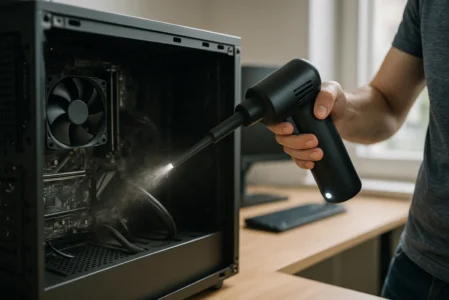
The model I have now been using for more than a year is the WHATOOK 6000 mAh air duster (see below). It reaches 60,000 rpm at its highest speed and has three power levels. The airflow is constant, powerful and, above all, adjustable. No more jolts, no more liquid gas sprayed onto components and no more forced breaks because the can has become cold. I particularly appreciate being able to adjust the intensity to what I am cleaning: a powerful burst for ventilation grilles, and a gentler flow when I get close to a fan or sensitive connectors.

Highlights :
Drawbacks :
On Amazon right now:
There is no need to watch the angle as you do with a pressurized can, and no need to worry about temperature or residual pressure. I plug it in when the battery is low, press the button and blow. It is that simple.
How the air duster performs after one year
One year after adopting it, my electric air duster has not changed. It has cleaned more than 100 PCs, dusty towers, customers’ laptops and dirty keyboards, and it still works like it did on day one. There has been no loss of power and the battery is still in perfect condition. For a device costing less than €40, I expected to replace it after a few months. In the end, it has held up much better than I would have thought at this price.
As for battery life, there is nothing to complain about. The battery lasts about an hour, but in practice I never run it continuously. A few minutes to blow out a keyboard and a minute to dust a fan are more than enough to handle several cleaning sessions during the day. I even use it to clean the inside of my car, blow pet hair out from behind furniture and dust a UPS. It has become a versatile tool for blowing dust away almost anywhere.
A question often comes up: can an electric air duster damage components? No. It produces dry air, with no moisture or liquid gas. The real risk of electrostatic discharge comes from rubbing fabric against components, not from a stream of air. After a year and more than 100 cleaned PCs, I have had no incident related to the air duster.
If I had to name one drawback, it would simply be forgetting to recharge it from time to time. But honestly, that is rare. Above all, the three airflow levels have become essential to my routine. I can switch from a powerful flow for a very dirty tower to a gentle mode near a fragile connector. This small air duster has clearly changed the way I work: cleaner, cheaper and more practical. It paid for itself in less than two months and is one of the few professional purchases I would make again without hesitation.
Which PC air duster should you choose? Here is the most powerful one
If you are looking for a computer air blower that is even more powerful than the model I use, there is an upgraded version from the same brand. This new air duster reaches 150,000 rpm, has a 9,000 mAh battery and offers three speeds (like the previous model, but more powerful). It also has a built-in LED light, which is useful when cleaning under a desk or inside a poorly lit tower.

Highlights :
Drawbacks :
On Amazon right now:
This is clearly the model to choose if you want maximum power for more intensive use or if you clean equipment in series. The same savings and ease of use, but with a larger energy reserve and an even stronger airflow. If you are hesitating between the two, this one is the ultra model, designed for people who want zero compromises.
Frequently asked questions about PC air dusters and blowers
No. It produces dry air, with no moisture or liquid gas. The real risk of electrostatic discharge comes from rubbing fabric against components, not from a stream of air. After a year and more than 100 cleaned PCs, there has been no incident.
60,000 rpm is enough to dust fans, grilles and keyboards. The gentle mode is recommended near fragile connectors. 150,000 rpm, on the ultra model, is suitable for intensive use or very dirty equipment.
A rechargeable model can be used anywhere without a cable, which is ideal when travelling or cleaning under a desk. A corded model offers unlimited power but restricts movement. For regular use, a rechargeable model is more than sufficient.