
Yes, Microsoft Defender will be sufficient in 2026 for most home users running Windows 11, provided you keep Windows up to date, do not disable the basic security features, and use a secure browser. It is no longer the minimalist antivirus of yesteryear; the latest independent tests rank it alongside the best free antivirus programmes.
However, the answer is not quite that simple: whilst Defender provides excellent protection against traditional malware, its most comprehensive anti-phishing protection is delivered via Microsoft Edge. With Chrome or Firefox, browsing relies on the browser’s own security features, unless a business configuration is in place using Microsoft Defender for Endpoint.
| Verdict | Our opinion |
|---|---|
| Family PC, office use, web browsing | Microsoft Defender is sufficient if Windows and the browser are up to date. |
| Cautious user who downloads little | No need to pay for antivirus software just to replace Defender. |
| Children and older users who tend to click on links | An antivirus with anti-phishing protection may be useful. |
| Professionals, sensitive data, computer networks | Provide a manageable solution and a backup. |
In this article
- Is Windows Defender enough in 2026?
- Microsoft Defender’s 2026 results
- Your browser makes all the difference to Windows Defender protection
- What Microsoft Defender protects effectively
- Enable Defender’s free ransomware protection
- When should you keep Microsoft Defender?
- Our review of Microsoft Defender in 2026
Is Windows Defender enough in 2026?
For everyday use, yes. Microsoft Defender Antivirus is built into Windows, enabled by default, updated via Windows Update, and complemented by the Windows Firewall, SmartScreen, protection against potentially unwanted applications, and anti-ransomware features.
Microsoft Defender’s 2026 results
To assess Microsoft Defender, it is important to distinguish between lab tests—which measure protection in isolation—and real-world PC use, where human error, phishing and dubious downloads matter just as much as the antivirus engine. The latest independent results are positive, but they do not all tell the same story.
AV-TEST January–February 2026: a perfect score on Windows 11
In the AV-TEST evaluation for January–February 2026 on Windows 11, Microsoft Defender Antivirus Consumer 4.18 achieved the highest score in all three categories tested. This is significant, as AV-TEST does not merely assess detection rates: the laboratory also takes into account the impact on the PC and false alerts.
| AV-TEST category | Microsoft Defender score | Practical review |
|---|---|---|
| Protection | 6/6 | The engine blocks the threats tested in this cycle very effectively. |
| Performance | 6/6 | The measured slowdown remains within acceptable limits for normal use. |
| Usability | 6/6 | Few false alarms and few annoying crashes for the user. |
| Total | 18/18 | Maximum score, on a par with several paid antivirus suites. |
In the same AV-TEST table, several competitors also scored 18/18: Avast Free Antivirus, Bitdefender Total Security, F-Secure Total, G Data Internet Security, Kaspersky Premium, McAfee Total Protection, Norton 360 and TotalAV. The conclusion, therefore, is not that Defender is dominating the market, but that it is now playing in the same league as well-established paid and free benchmarks.
AV-Comparatives March 2026 highlights a reliance on the cloud
The AV-Comparatives Malware Protection Test from March 2026 is of interest because it distinguishes between offline detection, detection with an internet connection, the final protection rate and false positives. The test covers 10,030 recent samples and simulates malicious files already present on a hard drive, USB stick or network share.
| AV-Comparatives test | Microsoft Defender result | What this means |
|---|---|---|
| Offline detection | 89.2% | Without access to the cloud, Defender performs less effectively. |
| Online detection | 98.1% | With internet and cloud services available, detection improves significantly. |
| Online protection | 99.93% | The final protection rate is very high: only a few test cases compromise the system. |
| False positives | 3 | Very good result: Defender blocks almost no clean files in this test. |
| Award | Advanced+ | Microsoft is among the top-ranked group in this test. |
Defender performs significantly better when the PC is connected to the internet. This makes sense, as Microsoft’s antivirus relies heavily on cloud services, file reputation and real-time intelligence. For a family computer that’s online every day, this isn’t a problem. For a PC that’s often offline, used with USB sticks or old installation files, you need to be more cautious.
Comparison with the other antivirus programmes in the test
Microsoft Defender doesn’t come out on top in every category. AV-Comparatives, for example, rates F-Secure, TotalAV, Bitdefender, G Data, Avast, AVG and Norton as having better offline detection. However, Defender makes up for this with an excellent final protection rate and only three false positives, a better performance than many competing suites in this respect.
| Product | Offline detection | Online detection | Online protection | False positives |
|---|---|---|---|---|
| Microsoft Defender | 89.2% | 98.1% | 99.93% | 3 |
| Bitdefender | 97.6% | 97.6% | 99.94% | 4 |
| Kaspersky | 92.1% | 97.8% | 99.97% | 2 |
| Norton | 96.3% | 98.7% | 99.97% | 9 |
| Avast / AVG | 96.3% | 98.7% | 99.97% | 9 |
| F-Secure / TotalAV | 98.6% | 99.1% | 99.98% | 19 |
To say that Defender is the best antivirus would be an overstatement, but to say it’s inadequate would be outdated. In 2026, it’s a very good built-in antivirus provided the PC is connected to the internet and kept up to date.
Your browser makes all the difference to Windows Defender protection
The real threat isn’t so much the virus itself as it is fake Microsoft support scams, fake delivery notifications, fake bank websites, malicious QR codes or cloned login pages. In this regard, Microsoft Defender SmartScreen is particularly closely linked to Edge.
Microsoft states that SmartScreen is used by Microsoft Edge to analyse visited websites, URLs and downloaded files. Microsoft’s documentation also specifies that web protection for Chrome and Firefox is primarily available within Defender for Endpoint when network protection is enabled, i.e. in a business environment, not on a home PC.
If you use Edge, Defender and SmartScreen work together seamlessly. If you use Chrome or Firefox, it’s not a major issue, but anti-phishing protection relies more on Google Safe Browsing, Firefox and any extensions you may have than on Defender itself.
What Microsoft Defender protects effectively
- Common types of malware: viruses, Trojans, spyware and suspicious downloaded files.
- Recent threats: cloud protection enables a rapid response when a new threat emerges.
- Unknown files: SmartScreen may display a warning about apps with no reputation.
- The firewall: Windows already includes adequate network protection for home use.
- Ransomware: Controlled access to folders can prevent unauthorised changes to your sensitive files.
Enable Defender’s free ransomware protection
Microsoft Defender includes controlled folder access. When this feature is enabled, Windows can block unknown apps that attempt to modify your documents, images or personal files. This is useful against certain types of ransomware, but it is not a foolproof solution.
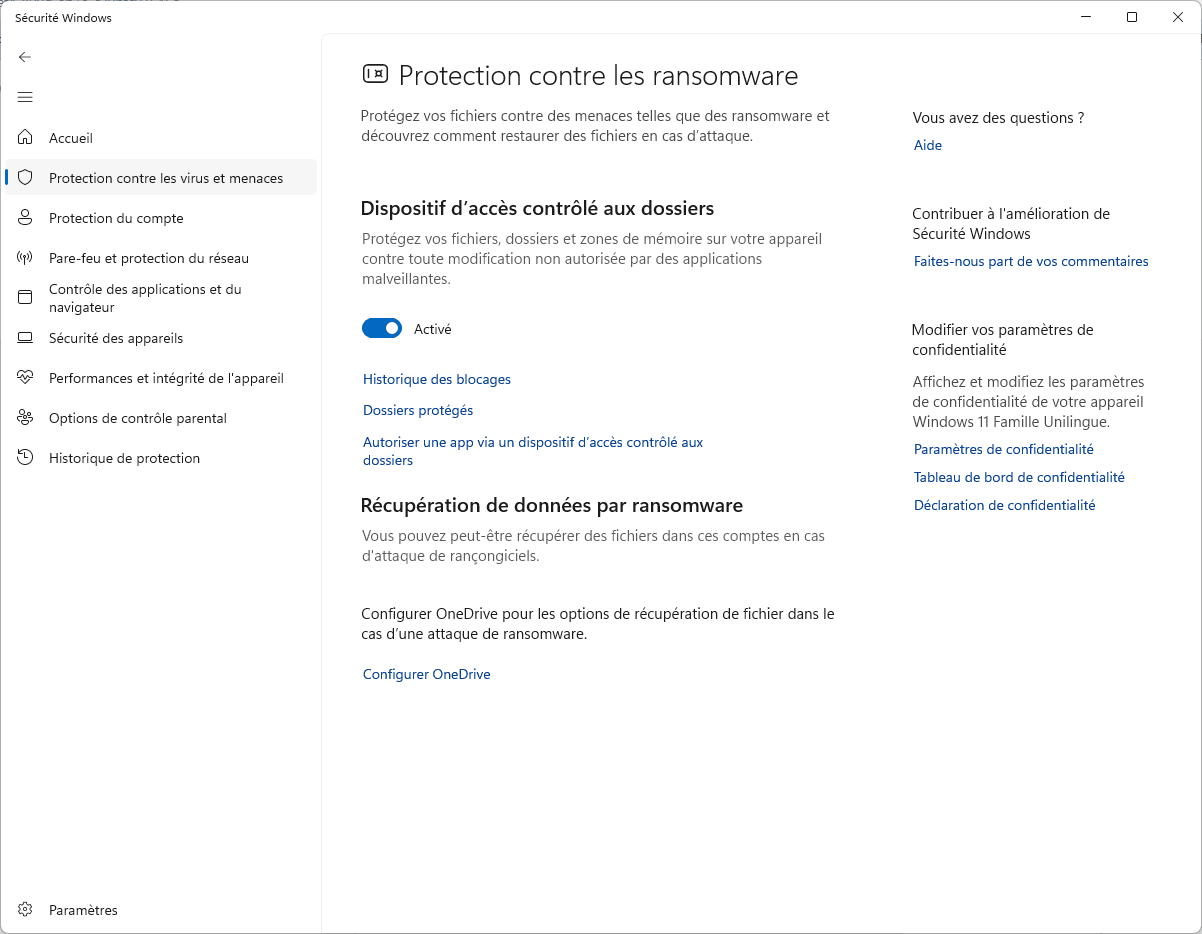
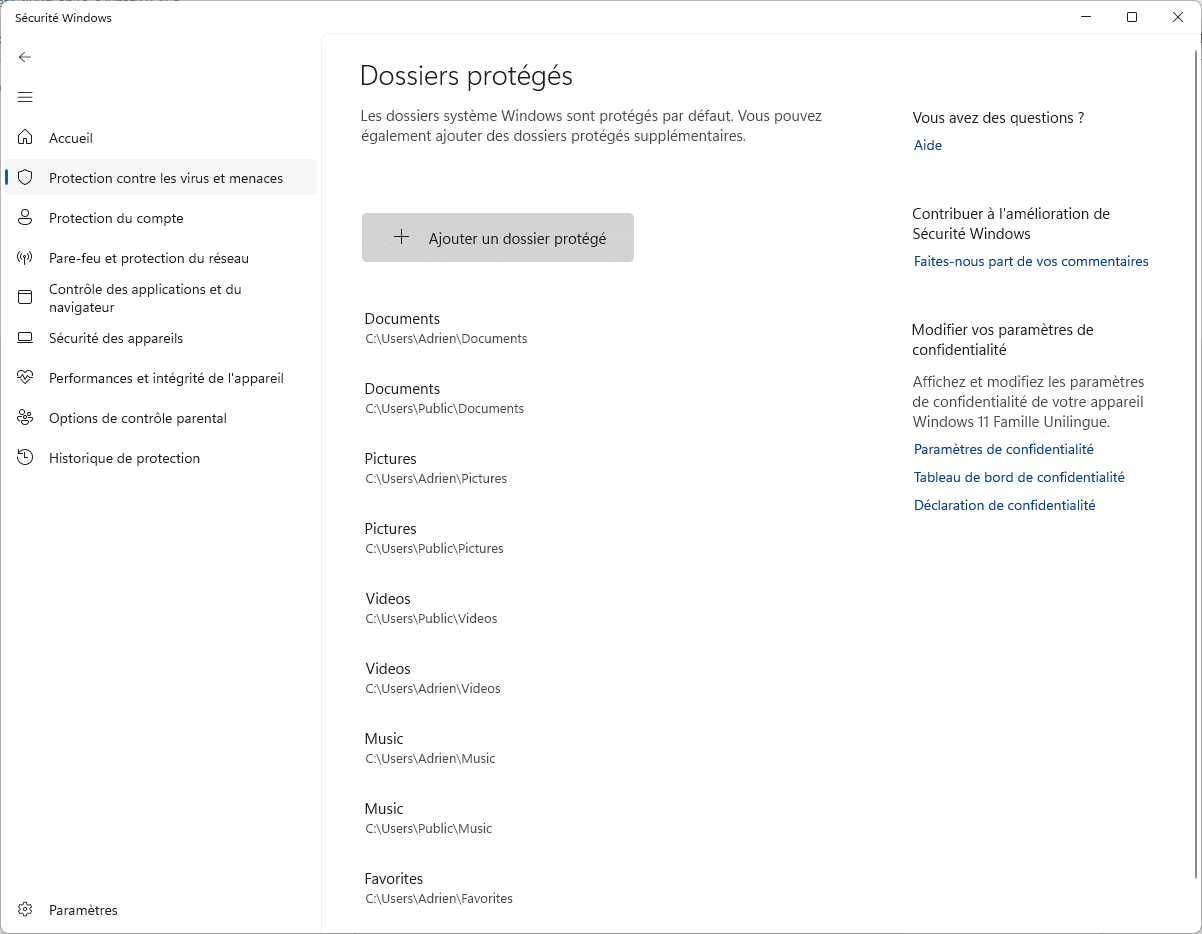
To enable it, open Windows Security, then go to Virus & threat protection, Ransomware protection, and turn on Controlled Folder Access. Then add your important folders if you store your files somewhere other than in Documents or Pictures.
The best approach is to combine this protection with an external or cloud backup. No antivirus software can replace a recent backup if a file is deleted, encrypted or modified by mistake.
When should you keep Microsoft Defender?
Keep Microsoft Defender up to date if you’re using Windows 11, download software only from trusted sources, don’t disable Windows Update, and practise good habits when dealing with email and text message attachments and links.
In that case, paying for antivirus software just for the sake of having something better isn’t necessarily worth it. You’ll be better off enabling two-factor authentication, using a password manager and setting up automatic backups.
When should you opt for a paid antivirus instead?
A paid antivirus programme may be worth the cost if you want scam alerts, parental controls, identity monitoring, a VPN, enhanced payment protection, priority support or a centralised dashboard for multiple devices.
This is also relevant for a computer used by someone who tends to click on pop-up alerts, installs a lot of free software, or doesn’t always know how to tell a genuine Microsoft page from a fake technical support page.
Our review of Microsoft Defender in 2026
Microsoft Defender is now a good default antivirus programme. In the 2026 tests, it achieved a perfect score from AV-TEST, a very high protection rate from AV-Comparatives and few false positives. For most home PCs, it is more than adequate.
It doesn’t turn users into phishing experts, and it works best with Edge (like much of the Microsoft ecosystem). If you stick with Chrome or Firefox, keep your browser up to date, avoid dodgy extensions and check URLs before entering a password.
The best compromise, if you don’t want to pay for antivirus software, is to stick with Microsoft Defender, enable the key features, use unique passwords, set up a backup, and only pay for an antivirus suite if you need its additional features.
We allow some readers to view our articles for free with an ad blocker. However, their number is currently too high for us to keep this access available to everyone.
You can disable your ad blocker to continue reading immediately, subscribe to enjoy all our content without ads, or come back a little later when the pressure has eased.
Access will be restored automatically as soon as the situation allows.