When you download a file from the internet, Windows displays a security warning before you open it. The same file may open without a warning if it came from another location. That difference is caused by invisible information Windows keeps about where the file came from.
Windows stores this information in a Zone.Identifier stream associated with Mark of the Web (MotW). SmartScreen and other Windows protections use it. In some situations, when a file is copied to Linux, it can even appear as a second file named Zone.Identifier.
In this article
Windows keeps track of where downloaded files come from
When you download a program, document, or archive with your browser, it saves information that lets Windows recognize where the file came from. This feature is called Mark of the Web and helps distinguish some files from the internet from files created directly on your computer.
One of the saved details is the security zone associated with the file. For example, ZoneId=3 corresponds to the Internet zone. This does not mean the document contains a virus; it tells some protections to carry out additional checks before the file is opened.
This mark depends on the software used to download the file and the file system where it is stored. Two copies of the same program can have identical contents but retain different information about their origin.
Zone.Identifier is stored in an invisible NTFS stream
On an NTFS-formatted disk, NTFS lets a file have multiple data streams. These streams store extra information without changing the file’s main contents. Zone.Identifier uses this mechanism to record where a download came from. It stays attached to the document or program but does not appear as a separate file in File Explorer.
For example, consider Assistools Portable, a free Windows maintenance utility I developed. When you download its executable in a browser, the browser records a stream containing information like this:
[ZoneTransfer]
ZoneId=3
HostUrl=https://assistouest.fr/iso/Assistools/Assitools_Portable.exe
This is one possible example because the saved information varies between browsers. Some browsers also add a ReferrerUrl address to identify the page from which the download started.
This stream does not change how the program works. It simply gives Windows extra information about its origin.
You can view the Zone.Identifier stream with PowerShell
To see how this works, download Assistools Portable from Assistouest and keep the file in your Downloads folder on an NTFS partition.
You do not need to run the program for this demonstration. Open PowerShell and enter the following command:
Get-Item -LiteralPath "$env:USERPROFILEDownloadsAssitools_Portable.exe" -Stream *PowerShell lists the streams associated with the program. If the browser saved its origin, you should see a stream named Zone.Identifier alongside the main stream that contains the executable’s data.
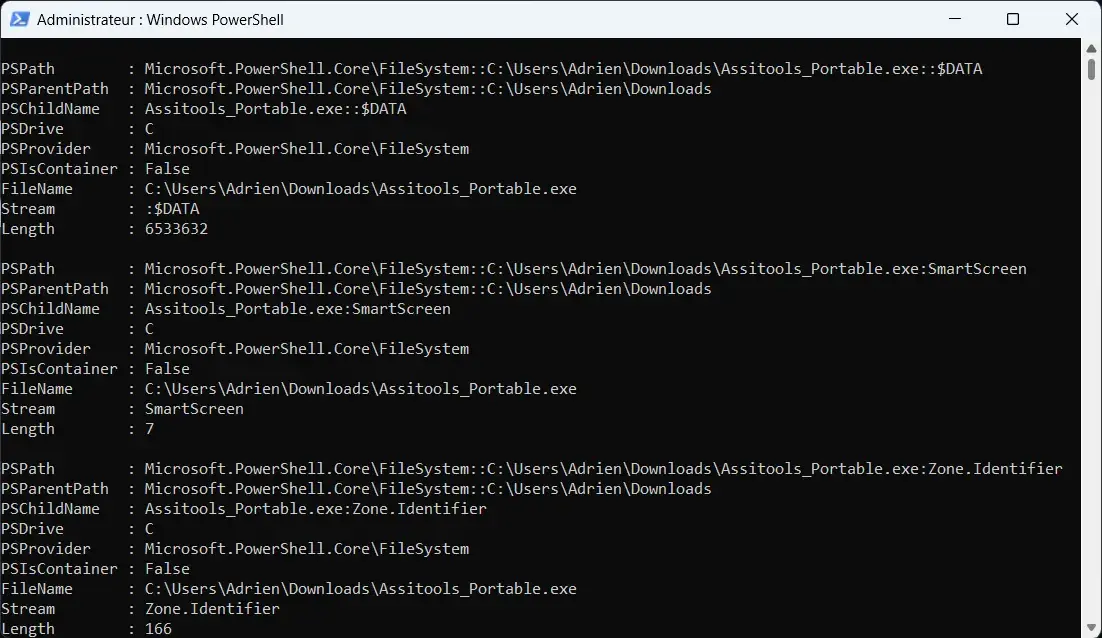
To view the information stored in that stream, run this second command:
Get-Content -LiteralPath "$env:USERPROFILEDownloadsAssitools_Portable.exe" -Stream Zone.IdentifierYou may see the value ZoneId=3 and, depending on the browser, the URL from which the program was downloaded.
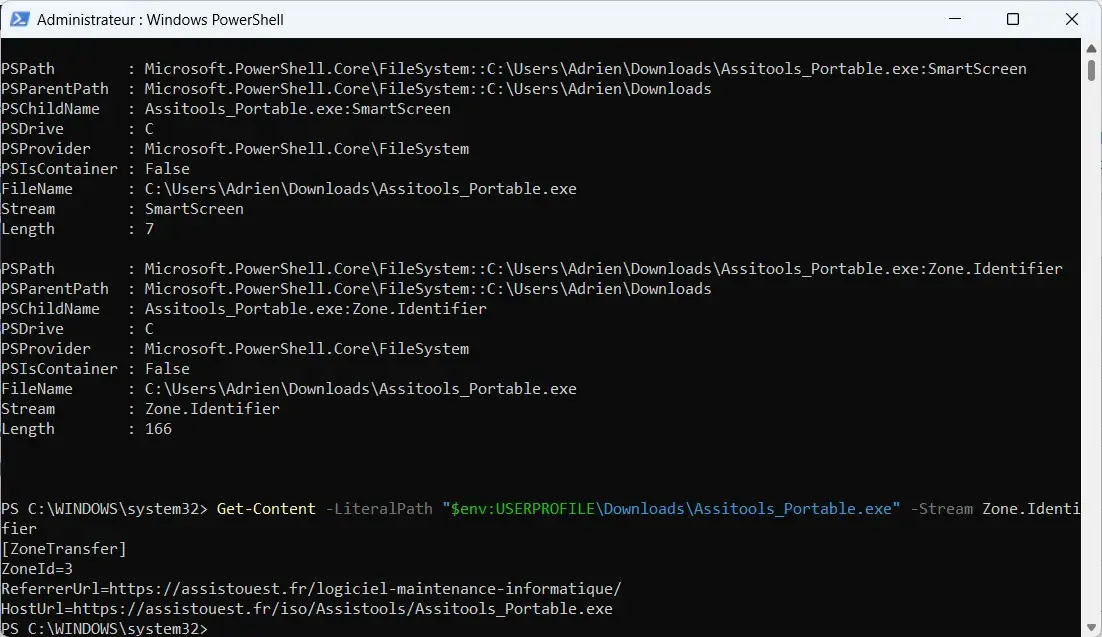
This information may also be visible indirectly in the file’s properties.
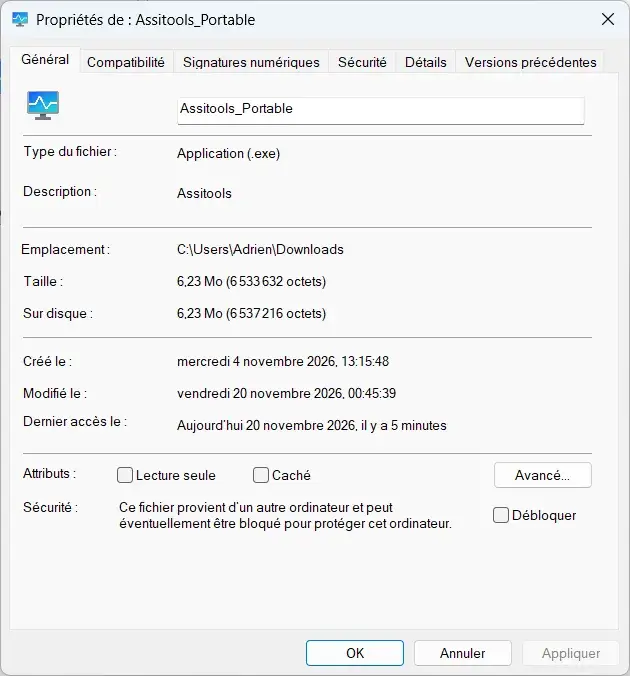
When you right-click a downloaded program and open Properties, Windows displays a warning that it came from another computer.
Zone.Identifier supports several Windows protections
A file’s origin matters especially when you try to run a program downloaded from the internet.
SmartScreen checks a file’s reputation before allowing it to run. This check considers the file’s reputation, its digital signature, and security information available from Microsoft. That is one reason an independent program such as Assistools may trigger a warning the first time it starts, even though this does not mean it contains malware.
Microsoft Defender Antivirus may also use Mark of the Web as an additional signal. Microsoft says a file’s origin can prompt a check with its cloud protection when a local scan cannot determine whether the file is dangerous. Zone.Identifier does not detect viruses by itself, and a program SmartScreen does not recognize is not necessarily malicious. If you are unsure about a download, you can scan the file without running it before deciding whether to open it.
This mark is also used by other Windows protections. Microsoft Office can block macros in documents that came from the internet. Since the October 2025 security updates, File Explorer has disabled previews for some files marked as coming from the internet.
This information also affects PowerShell execution policies. With the RemoteSigned policy, scripts downloaded from the internet must be signed by a trusted publisher.
Why does Zone.Identifier appear as a second file on Linux?
On NTFS, Zone.Identifier is stored in a data stream attached to the main file. Not every file system used by Windows and Linux handles this mechanism in the same way. During some transfers, the metadata is saved in a separate file instead of staying attached to the original file.
When a program or transfer tool tries to preserve an NTFS stream on another file system, some tools store it as an ordinary file.
You may then see two files in the same folder:
Assitools_Portable.exe
Assitools_Portable.exe:Zone.Identifier
The first file contains the downloaded program. The second contains the information that was originally stored in its Zone.Identifier stream.
This can happen with Windows Subsystem for Linux (WSL). When you copy a downloaded file from File Explorer into a Linux folder accessible through wsl.localhost, a second file containing this metadata may be created.
Some network shares may also produce a file with a different name, such as Assitools_Portable.exe.Zone.Identifier. This second file simply contains origin metadata that the copy process preserved in another form.
We allow some readers to view our articles for free with an ad blocker. However, their number is currently too high for us to keep this access available to everyone.
You can disable your ad blocker to continue reading immediately, subscribe to enjoy all our content without ads, or come back a little later when the pressure has eased.
Access will be restored automatically as soon as the situation allows.