Have you deleted several gigabytes of files on Linux, but the available space on your SSD has not increased? This can happen when a program continues using a file after it has been deleted. Linux temporarily keeps the disk space allocated to that file, even though it no longer appears in your file manager.
In this article
Why does Linux keep a file after it has been deleted?
When you permanently delete a file on Linux, its name disappears from its directory. That does not necessarily mean the space it occupied is released immediately.
Some programs, such as web servers, databases and applications that write to log files, can keep a file open while they run. Linux gives them a file descriptor, a reference that lets them continue reading or writing to the file without looking up its name for every operation. If you delete the file while a program is using it, the name disappears, but the program can still access it through its descriptor. Linux waits until the last open reference is closed before freeing the disk space.
This behavior prevents deleting a file from abruptly interrupting a program. Linux tracks this through the hard-link count (nlink / LINKS in lsof): unlink() removes the directory entry and decrements the count. The system frees the blocks and inode only when the count reaches zero and no process still has the file open.
Restarting Linux is usually enough to reclaim disk space
The simplest solution is to restart your computer. During a restart, Linux stops running programs and closes their file descriptors. Deleted files that were still held open can then be fully released.
This method does not require any special commands and is useful when you do not know which program is keeping the file open. Remember to save your work before restarting.
You can also close and reopen the program if you can identify it. This can reclaim the space without restarting the whole system.
To check the available space after restarting, open a terminal and run:
df -h /This command shows the total capacity, used space and available space on Linux’s main partition. If the deleted file was on another partition, check that partition instead.
I tested it, and the space stayed occupied after deleting the file
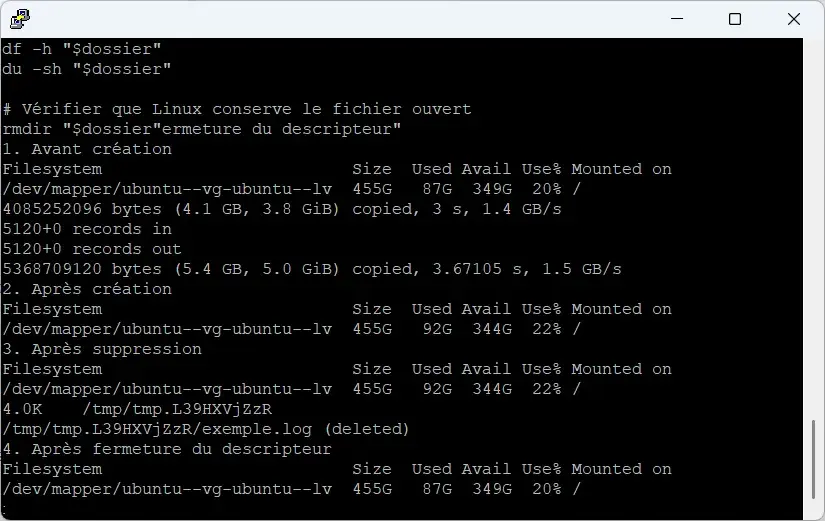
To reproduce this on Ubuntu, I created a temporary 5.4 GB file and kept it open in a process before deleting it. I then used df -h to compare the space used on my SSD at each stage.
Here are the results on my computer:
| Step | Disk space used | Available space |
|---|---|---|
| Before creating the file | 87 GB | 349 GB |
| After creating the 5 GiB file | 92 GB | 344 GB |
| After deletion while the file was still open | 92 GB | 344 GB |
| After closing the descriptor | 87 GB | 349 GB |
Deleting the file did not free the 5.4 GB it occupied. Although it disappeared from its directory, the available space on my SSD stayed at 344 GB instead of returning to 349 GB.
The du command showed that the temporary directory used only 4 KB. However, when I checked the file descriptor, Linux still displayed (deleted) because the deleted file was still open.
As soon as I closed that descriptor, the 5.4 GB was freed immediately, without restarting Ubuntu. Available space returned to 349 GB, the same as before I created the file.
Find deleted files that are still using disk space
If you do not want to restart Linux, you can search for deleted files that are still open in a program. The lsof utility shows this information directly in the terminal.
sudo lsof +L1This command searches for open files whose link count is zero. The results identify the program in the COMMAND column and its process ID in the PID column.
The NAME column may show the file’s original path followed by (deleted). The SIZE/OFF column can show its size when that information is available.
You can then close the program normally. If the file is held by a Linux service, restarting that service may also release the space.
sudo systemctl restart service-nameReplace service-name with the name of the service. On a production server, do this carefully because it may temporarily interrupt running jobs or connections.
On a Linux server, you can also use Cockpit to monitor disk space and restart services from a graphical interface instead of doing everything in the terminal.
Why can disk space remain occupied even after a restart?
If your disk is still full after restarting, the cause may be different. Check that the file was permanently deleted and is not simply in your desktop environment’s trash.
Filesystem snapshots can also retain disk space. With Timeshift on Linux, some blocks may still be needed by backups and cannot be freed by deleting the visible files alone.
Other situations can use a lot of storage. Docker container log files can grow quickly when their size is not limited. A similar issue occurs with WSL2 on Windows, whose virtual disk may keep its size even after space is freed inside Linux.
When Linux keeps a deleted file because a program is still using it, the available-space calculation is not wrong. The storage remains allocated until the last reference to the file is closed. A simple restart usually fixes the problem without any further technical work.
We allow some readers to view our articles for free with an ad blocker. However, their number is currently too high for us to keep this access available to everyone.
You can disable your ad blocker to continue reading immediately, subscribe to enjoy all our content without ads, or come back a little later when the pressure has eased.
Access will be restored automatically as soon as the situation allows.