


Are you preparing a road trip, an outdoor getaway or a few days of wild camping, but keep asking yourself: how will I charge my laptop there? With no outlets, overloaded facilities or incompatible connections, electricity quickly becomes a precious resource. There are now mobile solutions that let you keep working, creating or simply staying connected away from the grid. This guide reviews the best options for each situation.
12V to 220V inverter: the simple way to charge a laptop in a car
A 12V to 220V inverter is one of the simplest ways to charge a laptop while travelling. It plugs directly into the car’s cigarette-lighter socket and converts the vehicle’s 12V direct current into 220V alternating current, like the electricity used at home. You then plug in your laptop charger as you would into a normal wall socket, with no special setup or additional accessory.
This equipment is especially useful in a motorhome, van or during long car journeys. Affordable, compact and easy to install, a 300W inverter can power a laptop and recharge a smartphone, tablet or camera through its built-in USB-C or USB-A ports. It is ideal for people who do not need a complete power station but want occasional independence without relying on an external connection.
Reliable and immediate, an inverter is ideal for occasional use, mobile workers and emergencies when you need to restore some autonomy quickly. Always check the maximum power supported by your device to avoid an electrical overload.

Highlights :
Drawbacks :
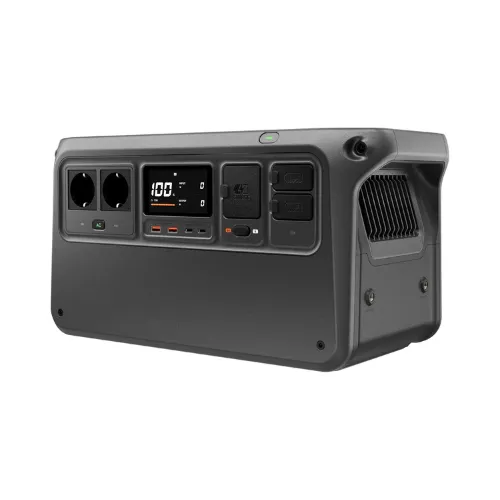
DJI Power 1000 V2: a portable power station for working outdoors
The DJI Power 1000 V2 is a 1,024 Wh portable power station designed to provide stable, continuous power for a range of electrical equipment. It can power several devices at once thanks to its high output, including computers, audiovisual equipment and some household appliances. It remains transportable despite its capacity, making it useful on the move or as a backup solution at home.
Its energy management relies on a lithium iron phosphate battery, known for its long service life and stability. Mains charging is fast, allowing much of the capacity to be restored in less than an hour, while the AC and USB outputs cover everyday and professional needs. Operation is very quiet, so it can be used indoors without significant disturbance.
The DJI Power 1000 V2 is mainly aimed at content creators, mobile technicians and users looking for independent power. It can be used on a shoot, off-grid or as backup during a power cut. Its focus on service life and energy stability makes it suitable for regular use without permanently depending on a mains outlet.
Highlights :
Drawbacks :
Off-grid solar kit: mobile, sustainable and silent energy
An off-grid solar kit is an all-in-one energy solution for mobile users or anyone seeking independence from the electrical grid. It consists of solar panels that capture sunlight during the day and store it in a lithium battery or portable power station. The electricity is then distributed on demand through USB, 220V or DC outputs to power electronic devices.
Suitable for many uses — laptop, smartphone, tablet, drone and electric cooler — a solar kit works for a van-based mobile worker, during a power cut or on a long camping trip. Most kits are plug and play and require no technical skills to deploy.

Highlights :
Drawbacks :
A correctly sized kit, for example a 100W panel and a 500 Wh battery, can cover a full day of moderate use after only a few hours of sunshine. Some models include a smart MPPT controller that optimises charging even in cloudy weather. Compared with generators, solar kits are silent, odourless and emission-free and can be used indoors or outdoors safely.
Rechargeable indefinitely, compatible with everyday devices and scalable because some models are modular, an off-grid solar kit is a sustainable answer to modern needs for mobility, comfort and environmental responsibility.
Generator: a backup option for outdoor charging
Generators remain a classic way to produce power independently, especially when high output is needed or sunshine is uncertain. Running on petrol or gas, they generate alternating current capable of powering a laptop, electric tools and more demanding equipment. They can therefore provide occasional help at a campsite, during outdoor work or in a prolonged power cut.
This is far from the most practical option for daily use or natural environments. Generators are noisy, bulky and require regular fuel, which limits their usefulness for van travellers and campers who value discretion. Their use is often forbidden at campsites and is poorly suited to protected areas. They also emit exhaust gases, making them less environmentally friendly.

Highlights :
Drawbacks :
On Amazon right now:
A generator can be useful occasionally, but modern power stations and solar generators now surpass it in comfort, silence and durability. For regular or extended autonomy, a cleaner solution suited to mobile use is a better investment.
Choose according to your traveller profile
There is no single right solution. It depends on the length of your stay, the autonomy you need and your means of transport. A weekend trip, year-round van living and a several-week road trip do not create the same requirements.
Here is a summary of the three main options:
| Profile | Suitable solution |
|---|---|
| Short trips | Car inverter |
| Van life and regular work | Portable power station |
| Long road trip | Power station and solar panel |
Eco mode, brightness and charging: save energy while travelling
Here are a few simple but effective tips for extending laptop battery life when electricity is scarce. A good setting can sometimes be more useful than a larger battery.
Use the laptop’s power-saving mode
Enable your operating system’s power management before leaving the mains. This reduces processor frequency, limits background activity and temporarily disables demanding tasks such as indexing and automatic updates. In practice, you can gain 30 to 60 minutes on an ultraportable. It is the first action to take when switching to camping or van-life mode.
Lower the screen brightness
On most computers, the screen remains the most power-hungry component. Reducing brightness to 50% or less can save up to 20% of the battery, depending on the panel. If the environment is very bright, use an anti-glare filter or move into the shade rather than increasing the backlight. Also turn off the backlit keyboard when it is not needed during the day.
Plan charging intelligently
When your energy source is limited, charge the laptop at the best time:
- Solar panel: connect the computer during peak sunlight, between 11 a.m. and 3 p.m.
- Power station: use a partial charging cycle, from 20% to 80%, instead of a full cycle. It is faster and helps preserve the battery.
- Car: charge during long journeys so you do not drain the vehicle battery with the engine off.
Combining these three practices can reduce your energy needs by up to 40% and extend the time spent off-grid without buying additional capacity.
If you work from a shared space while travelling, screen privacy also deserves attention. Our article on protecting your screen from prying eyes while travelling explains the right habits.