

If you are coming from Windows, you have probably got used to installing software from the Internet: you download an .exe file, double-click it, and follow the installation wizard.
Linux does have executable files, but there is no single format like Windows’ .exe. Depending on your distribution and how the software is distributed, you may come across .deb or .rpm packages, Flatpak, Snap or AppImage applications—or no file to download at all.
In most cases, you simply open your distribution’s app store (much like the Microsoft Store) and click Install.
In this article
Which formats are used to install software on each distribution
Linux brings together many distributions, and they do not all use the same software management system.
Ubuntu, Debian and Linux Mint mainly use .deb packages with APT. Fedora uses .rpm packages with DNF, while Arch Linux uses Pacman.
The package manager then downloads the software, installs everything it needs and handles future updates.
| If you use | For installing software | Format used | Example |
|---|---|---|---|
| Debian, Ubuntu, Linux Mint | APT | .deb | sudo apt install vlc |
| Fedora, RHEL | DNF | .rpm | sudo dnf install vlc |
| openSUSE | Zypper | .rpm | sudo zypper install vlc |
| Arch Linux, Manjaro | Pacman | .pkg.tar.zst | sudo pacman -S vlc |
| Many distributions | Flatpak | Flatpak | flatpak install flathub org.videolan.VLC |
| Many distributions | Snap | Snap | sudo snap install vlc |
Software repositories centralize installation and updates
On Linux, software installation largely relies on software repositories. These are servers that bring together the packages available for your distribution, where the system can directly look for the program you need.
Your distribution already knows the addresses of these repositories. When you ask to install software, the package manager finds the version suited to your system, downloads the necessary files and automatically installs any dependencies the program needs. It can then use the same repositories to retrieve future updates.
On Debian, Ubuntu or Linux Mint, this work is handled by APT. For example, to install VLC, simply use:
sudo apt install vlcFedora uses DNF with a similar command:
sudo dnf install vlcOn Arch Linux, the Pacman package manager installs the same software with:
sudo pacman -S vlcopenSUSE uses Zypper:
sudo zypper install vlcThe principle is fairly similar regardless of the distribution. You specify the software you want to install, and the package manager finds the files in the configured repositories, checks the dependencies and performs the installation.
This setup means you do not have to keep every installer or monitor updates for all your software separately. A large part of the applications installed from repositories can be updated at the same time as the rest of the system.
Linux app stores work like an app store
You do not have to use the terminal to install software on Linux. Most distributions offer an app store, meaning a graphical interface that works a bit like the Microsoft Store on Windows.
You can search for an application, read its description and click Install without knowing which command to use or which package format it requires. The app store then retrieves the software from the sources configured on your system.
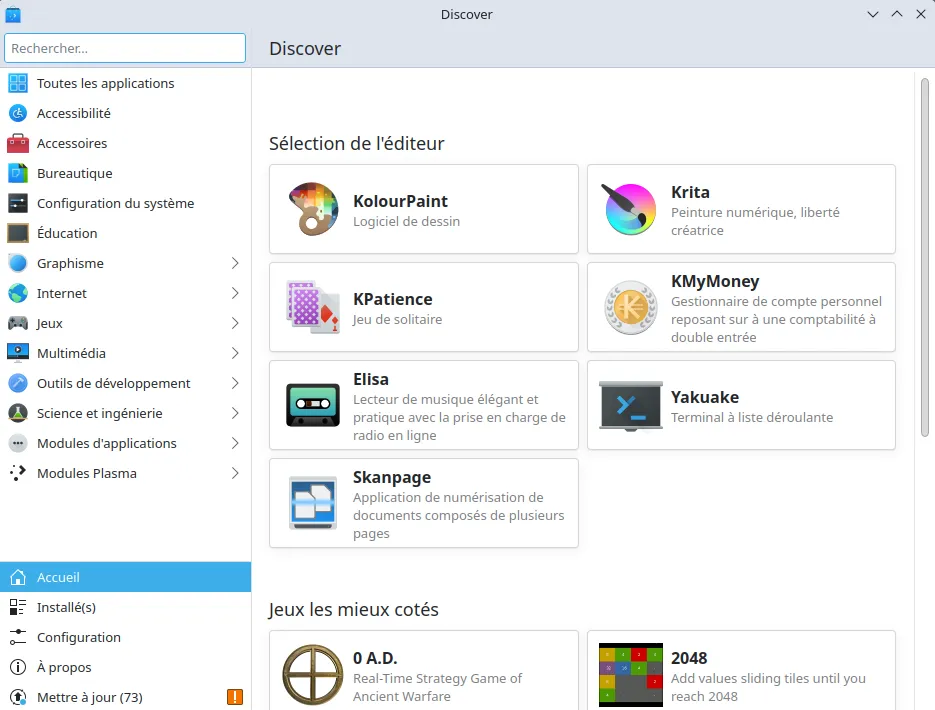
For example, Ubuntu offers its App Center, while KDE environments use Discover. GNOME also has GNOME Software, which is available on several distributions.
These app stores can bring several sources together in one place. Depending on your distribution and its configuration, the same interface may offer software from official repositories, Flatpak or Snap.
Snap is built into Ubuntu
Snap is an application distribution format developed by Canonical and particularly integrated into Ubuntu. On current Ubuntu versions, everything it needs to work is already installed, and the App Center directly offers Snap applications.
A Snap bundles much of what the application needs to run. This lets the publisher offer the same version regardless of the libraries installed on the system and release updates without waiting for a new version of Ubuntu.
Snap also provides an application isolation system. When a Snap uses confinement, the application runs in a restricted environment and cannot freely access the entire system. Access to files, the camera, the microphone or other resources is controlled through permissions designed for that purpose. This isolation relies on Linux security mechanisms such as AppArmor, Seccomp and cgroups.
Updates are managed automatically by snapd, allowing applications to receive new versions directly from their publisher.
You can install a Snap from the terminal:
sudo snap install vlcSnap applications are directly available from the App Center and install like any other application.
Can you run a Windows .exe file on Linux?
A .exe file is not supported natively by Linux. The program expects to find Windows libraries, APIs and behavior, which Linux does not provide directly.
However, some Windows software can run thanks to Wine. Wine provides a compatibility layer that reproduces part of the environment expected by Windows applications and translates their calls so they can run on Linux. It is neither a virtual machine nor a complete Windows installation.
Compatibility depends heavily on the software. Some applications work almost perfectly, others require specific settings, and some simply do not work at all. Software that uses specific drivers, protection systems or features closely tied to Windows can cause more problems.
Tools such as Bottles make Wine easier to use by letting you create separate environments tailored to each application. For Windows games on Linux, Proton is largely based on Wine and adds several technologies designed to improve compatibility with Windows games.
Can you install an .exe on Ubuntu?
Ubuntu cannot run Windows programs natively. Some .exe files may nevertheless work with Wine or other tools, but compatibility depends on the software.
We allow some readers to view our articles for free with an ad blocker. However, their number is currently too high for us to keep this access available to everyone.
You can disable your ad blocker to continue reading immediately, subscribe to enjoy all our content without ads, or come back a little later when the pressure has eased.
Access will be restored automatically as soon as the situation allows.