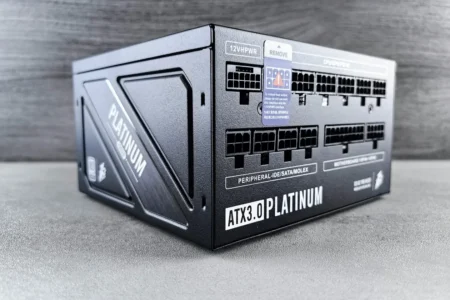
A cable coming out of your PC power supply without being connected to anything is nothing unusual. It is very common with non-modular power supplies because all the cables are permanently attached to the unit, whether your configuration needs them or not.
Your computer does not necessarily use every available connector. If you only have one SSD, a few SATA devices, a graphics card that needs only a small number of PCIe connectors, or no accessory using Molex, some cables will simply remain unused inside the case. They cause no problem as long as they are properly secured and do not interfere with the fans.
The more fixed cables a power supply has, the harder it is to keep a clean build in a small case. Modular power supplies were designed to avoid this accumulation of unnecessary cables.
In this article
Modular power supplies eliminate unnecessary cables
On a non-modular power supply, every cable is permanently attached to the unit. Even if your PC uses only some of them, the others are still inside the case and have to be stored somewhere.
| Modular | Non-modular | |
|---|---|---|
| Cables | Detachable | Attached to the unit |
| Unused cables | Stay in the box | Stay inside the PC |
| Cable management | Easier | More cumbersome |
With a modular power supply, the cables are detachable and you connect only the ones your configuration needs. If you do not use a second PCIe cable or several SATA cables, they simply stay in the box instead of taking up space inside the PC.
Semi-modular power supplies also exist. They keep the essential cables permanently attached to the unit, such as those for the motherboard or processor, while the others can be added according to the PC’s needs.
The difference between a modular and a non-modular power supply mainly comes down to their design. With equivalent specifications, modularity does not change performance, but a modular model avoids many unused cables and makes cable management much easier.
This unconnected cable may not have been forgotten
Seeing a loose cable inside your case does not mean that a component was connected incorrectly or forgotten during the build. A power supply is designed to power many different types of configurations, and it may provide more connectors than your computer actually uses.
A PCIe cable may be unused if your graphics card does not need another one. The same applies to SATA connectors when you have only a few drives or peripherals, and to Molex connectors, which are used much less today. As long as the components your configuration needs are properly powered, these cables can remain disconnected without causing a problem.
If your computer works normally, no component is missing, and no error message is displayed, an unused cable is simply the result of the number of connectors provided by the power supply.
You can simply tidy away the cables you do not use
With a non-modular power supply, the unused cables remain attached to the unit, so you need to find them a place inside the case. The easiest solution is to bundle them neatly and store them in the cable-management area, behind the side panel, or beneath the power-supply shroud when the case has one.
To keep a cable away from a fan or prevent it from getting in the way during assembly, you can use cable ties for PC cables to hold the bundles together. They also stop the cables from moving when the PC is transported or handled.
Never cut a cable simply because you are not using it. The connector at its end keeps the electrical contacts inside an insulated enclosure. Cutting the cable could leave one or more live conductors exposed inside the case. If they touch the metal chassis, another conductor, or a component, they could cause a short circuit and damage the power supply or the hardware.
With a non-modular power supply, unused cables simply need to be stored properly. If your unused cables have become a nuisance or you are considering replacing the unit, switching to a modular power supply can be a good opportunity to start again with a cleaner build. If you plan to replace your power supply, take a look at our selection of the best ATX power supplies to avoid dealing with unnecessary cables again.
We allow some readers to view our articles for free with an ad blocker. However, their number is currently too high for us to keep this access available to everyone.
You can disable your ad blocker to continue reading immediately, subscribe to enjoy all our content without ads, or come back a little later when the pressure has eased.
Access will be restored automatically as soon as the situation allows.