

Windows and macOS treat your computer as a resource to exploit. As soon as you enter your password, dozens of processes map your habits, files and location to feed advertising servers. You may think you own your machine, but you are only an authorized user renting space on a tool owned by software giants.
Your current operating system can leave you exposed because it is built to connect, share and synchronize everything by default. Security is rarely the priority in an architecture that must remain compatible with thousands of third-party apps and trackers.
If you really want to isolate your data and take back control, you need a different approach. Some operating systems are designed to encrypt, compartmentalize and erase your traces.
These four computing environments are fortresses. Here is what sets them apart.
In this article
1. Qubes OS: extreme isolation through virtualization
Qubes OS treats every application as potentially hostile and isolates it in its own domain. The system uses hardware virtualization to compartmentalize different activities, separating browsing, work, sensitive data, networking and peripherals into distinct environments. This separation helps prevent a local compromise from spreading across the system, containing an incident instead of allowing it to become a system-wide breach.
In practice, Qubes OS is built for sensitive workstations. It lets you strictly separate personal and professional activity, open risky files in disposable environments and handle critical data with minimal exposure. That makes it useful for people at greater risk, such as security researchers, investigative journalists and developers working with untrusted code, who need to limit the impact of a mistake or a malicious file.
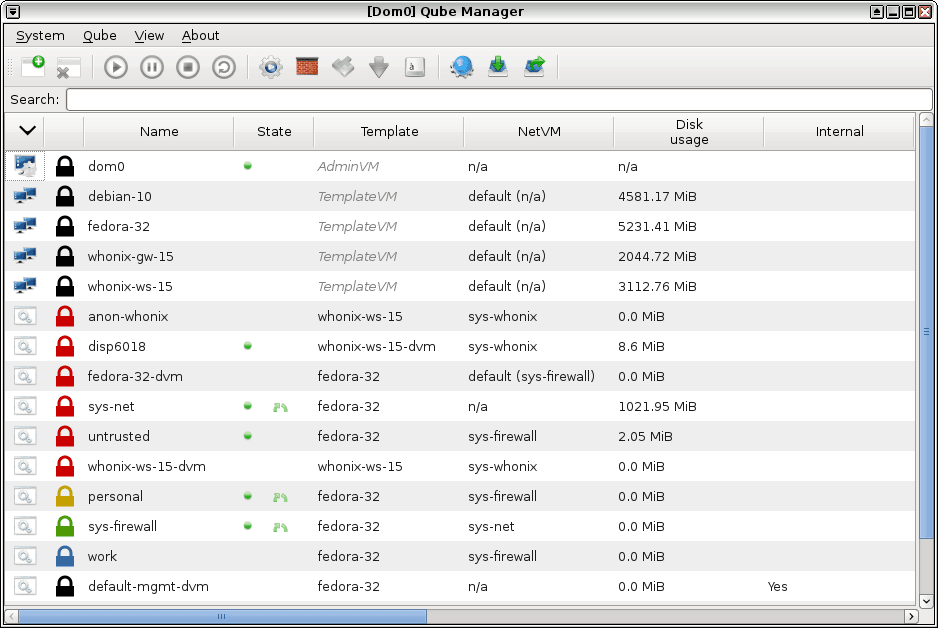
This level of security comes with trade-offs. Qubes OS needs recent hardware that supports virtualization, as well as plenty of memory to keep several domains running. It also takes time to learn, because security depends on both the architecture and the user’s discipline. Qubes OS is not designed for effortless everyday use; it is for people who put isolation and control ahead of simplicity.
If you’re serious about security, @QubesOS is the best OS available today. It’s what I use, and free. Nobody does VM isolation better. https://t.co/FyX5NX47cS
— Edward Snowden (@Snowden) September 29, 2016
Qubes is widely regarded as a leading secure operating system and has been recommended by Edward Snowden, researchers and organizations such as the Freedom of the Press Foundation. It has been presented at conferences and examined in academic research. Its design is continuously reviewed by the community.
2. Tails: the amnesic OS for anonymity
Tails is designed to shut down without leaving a trace. It runs as a live system from a USB drive and is never installed on the host computer. Each time you shut it down, the session is erased, preventing later recovery of data, browsing history or activity traces. This amnesic design helps protect against forensic analysis and persistent compromise when the computer you are using cannot be trusted.
All network traffic is automatically routed through the Tor network. No application can communicate outside this tunnel, which helps prevent IP address and metadata leaks. The included tools are deliberately limited and configured by default to reduce the risk of user error.
Tails is useful for occasional anonymous sessions on untrusted hardware. You can use it on a public, borrowed or potentially compromised computer without exposing your personal data or identity. This makes it a practical tool in sensitive situations where leaving no trace after use is the priority.

 assistouest.fr
The NSA itself reportedly described Tails as a major threat to its surveillance capabilities. The OS became internationally known after Edward Snowden used it in 2013 to communicate discreetly with journalists Laura Poitras and Glenn Greenwald during the NSA disclosures. Since then, many NGOs, journalists, activists and whistleblowers have recommended Tails as an essential tool for secure communication. It is partly funded by the Tor Project and organizations that promote digital freedom, and it regularly undergoes public security audits.
3. OpenBSD: proactive security in a minimalist Unix system
OpenBSD is often cited as a benchmark for Unix security because security is built into the system’s design. The project set out to create an operating system that is secure by default by minimizing its attack surface, disabling unnecessary services and systematically auditing code to find errors before they become exploitable vulnerabilities. Components are scrutinized, and protections such as strict privilege separation, package signature checks and advanced memory defenses are built into the system.
The system exposes no listening ports by default, enables a firewall and uses memory protections that prevent pages from being both writable and executable, as well as address randomization to counter common exploits. These protections are part of its foundations. In practice, they reduce the attack surface, make process behavior more predictable and reduce the need for manual configuration to achieve a strong security baseline.
The developers have even created safer functions to replace risky C constructs and integrated cryptographic primitives into the kernel and system environment. The team releases fixes quickly for confirmed vulnerabilities, and the project remains committed to proactive security rather than a purely reactive approach. This makes OpenBSD a strong choice where resilience against attacks is a fundamental requirement.
4. Whonix: network isolation in virtual machines
Whonix separates the work environment from network access to prevent identity leaks at their source. It is built around two distinct environments: one connects exclusively to the Tor network, while the other runs the user’s applications. This architecture prevents direct communication with the internet outside the Tor tunnel and makes anonymity a structural requirement.
This approach offers strong protection against human error and malware that tries to reveal a real IP address. Applications run in an environment that knows nothing about the outside network, while the Tor gateway acts as a strict, non-bypassable filter. Even malware with elevated privileges remains inside a boundary that prevents it from identifying the host machine or its user. Whonix does not promise absolute invisibility, but it makes accidental leaks extremely difficult.
Whonix is designed for ongoing use and can be integrated into an existing setup, so you can work, communicate and browse while maintaining a high level of privacy. This combination of built-in anonymity and everyday usability makes it useful for people who need discretion on a regular basis.
What should you expect from a secure operating system?
A secure operating system is neither invulnerable nor free of flaws. It is designed on the assumption that attacks will happen. The key question is not whether a vulnerability exists, but whether it can cause lasting damage. A truly secure system aims to reduce opportunities for attack and prevent a local mistake from turning into a full compromise.
The first priority is reducing the attack surface. A secure OS should run only the services it needs, limit exposed components and restrict code running with elevated privileges. Fewer features mean fewer potential entry points. This deliberate simplicity makes the system more predictable and easier to manage.
Isolation and process compartmentalization
Applications should be confined so they cannot freely access the rest of the system, sensitive data or the network. When software is compromised, the system should contain the incident, limit the damage and stop it from spreading. Security depends on strict separation of responsibilities and privileges.
A secure operating system should also withstand modern exploitation techniques. Most attacks target memory and execution mechanisms, so an OS should include built-in defenses that make such attacks complex, unstable and costly to carry out, as well as difficult to automate.
Resistance to persistence
Attackers rarely want only temporary access; they want to stay. A secure OS should protect critical components, verify integrity at startup and prevent persistence mechanisms from being installed silently. It should also make it possible to return quickly to a known-good state when something seems wrong.
Security also includes the network. A capable operating system takes a restrictive stance by default, limits unnecessary communications and avoids trusting the network environment automatically. Traffic should be controlled and accidental leaks made difficult, so the system does not become a source of exposure itself.
A secure OS must account for human error
Human error is inevitable, so a system should absorb mistakes instead of amplifying them. Defaults should be cautious, sensitive actions clearly identified and dangerous behavior difficult to trigger without explicit intent. Security should not depend on vigilance alone; it should come from a defensive architecture maintained over time.
We allow some readers to view our articles for free with an ad blocker. However, their number is currently too high for us to keep this access available to everyone.
You can disable your ad blocker to continue reading immediately, subscribe to enjoy all our content without ads, or come back a little later when the pressure has eased.
Access will be restored automatically as soon as the situation allows.