


Planet Search is a browser extension that replaces your search engine and routes your queries through its own servers. You can keep searching from Chrome’s address bar as usual, but your queries are no longer sent directly to Google, Bing or the search engine you chose.
In our test, a search made with Planet Search first went to planet-search.com, then through 840.us.prosrch.com and search.extsrch.com before reaching Yahoo. The search query was preserved throughout the process, while identifiers such as sid=840 and subid=TMBm1_PN100 were added along the way.
This kind of chain can identify where traffic comes from and route it through different search services. The final destination may also vary depending on the route selected by the server. Planet Search therefore behaves less like an independent search engine and more like an intermediary that takes control of your searches before forwarding them elsewhere.
In this article
What is the Planet Search extension?
Planet Search is an extension available from the Chrome Web Store that presents itself as a search engine. Once installed, it can become the search provider Chrome uses when you type a query directly into the address bar.
Technically, the extension does not need to make deep changes to your browser to do this. Its manifest.json simply declares planet-search.com as the default search provider using a feature built into Chromium. The configured address is:
https://planet-search.com/search/?q={searchTerms}Chrome replaces {searchTerms} with your query and sends it directly to Planet Search.
This is also why the extension can be misleading if you look only at its permissions. It does not contain a complex script that intercepts every page you visit, and its background.js file is empty. The domains that receive your searches afterwards, such as prosrch.com or search.extsrch.com, are not even listed in its code.
The important logic is on the server. The extension simply makes planet-search.com your starting point. Once a query arrives, the servers can send it through other intermediaries or search engines without requiring a new version of Planet Search on your computer.
Is Planet Search dangerous?
Planet Search does not behave like a traditional virus that searches through your files or installs several components deep inside Windows. On our test machine, we found no related system service, scheduled task designed to reinstall it, or Windows policy forcing it to remain installed.
Its behaviour is still concerning because it inserts itself directly into your searches. A query typed in the address bar might contain a product name, an address, a personal question, a computer problem or other information you thought you were sending only to your usual search engine.
With Planet Search, that query first passes through several intermediary services. In our capture, it crossed three domains before reaching Yahoo, with several routing identifiers added along the way.
This makes Planet Search similar to a browser hijacker. It does not try to take control of your whole computer, but it does take over your search engine and the route your queries follow.
Remove Planet Search from Chrome or Edge
To remove Planet Search, open the extension-management page directly by pasting this address into your browser’s address bar:
chrome://extensions/?id=kadaohckdkghfaclhjmkmplebcdcnfnpThis address works in Chrome and Edge. It takes you straight to Planet Search, where you can disable and then remove the extension.
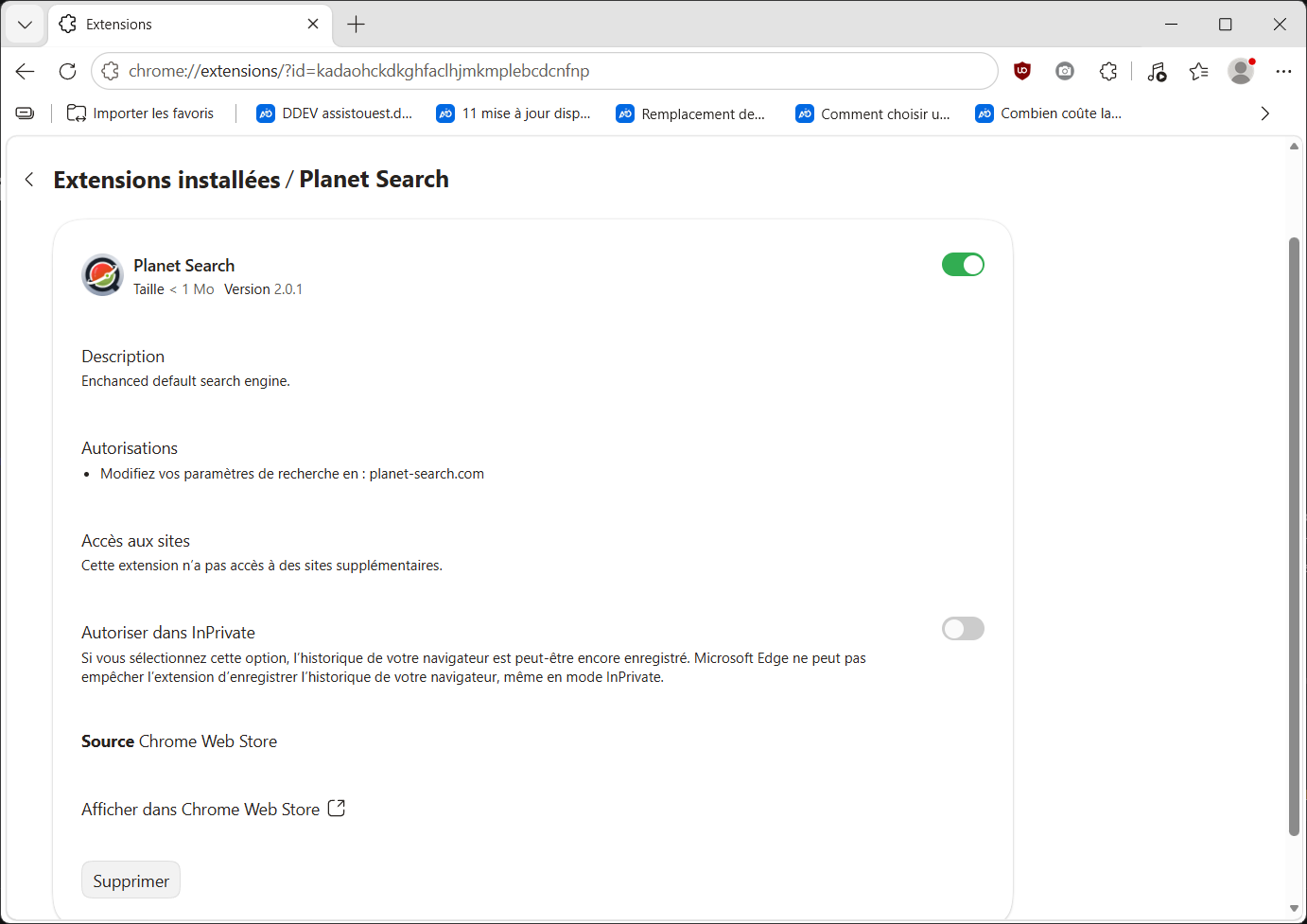
Removing Planet Search may not immediately restore your usual browsing setup. Because the extension changed the browser’s search provider, that setting may remain different from the one you used before, even after the extension is disabled or removed.

 assistouest.fr
After removing Planet Search, check the default search engine in Chrome or Edge and switch it back to your preferred provider. If your searches still go through Yahoo, Bing or another service you did not choose, this is the setting you need to change.
Scan your computer after removing Planet Search
Once Planet Search is gone and your usual search engine is restored, it is sensible to scan your computer. The extension itself is fairly easy to remove, but if it appeared alongside another piece of software or after installing a suspicious program, Planet Search may not be the only unwanted item on your PC.
For this kind of issue, AdwCleaner is a good fit. This free tool, now developed by Malwarebytes, specialises in detecting adware, potentially unwanted programs and browser hijackers. It requires no subscription and can run a one-off Windows scan to look for other items that may have changed your browser.
You can also run a full scan with your usual antivirus if Planet Search appeared without you knowing how it was installed. Windows Defender can already perform this check, but other free options are available if you want a second opinion or would like to change your protection.

If no additional threats are found, Planet Search has disappeared from your extensions, and your searches now go directly to the provider you chose, the hijacking should be over.
Clear cookies and temporary browser files
After removing Planet Search, you can also clear cookies, the cache and temporary files left by your browser to remove some of the traces created by the redirects. To go beyond Chrome’s built-in cleanup, see my review of PrivaZer, which covers removing browsing traces and leftover files in Windows.
We allow some readers to view our articles for free with an ad blocker. However, their number is currently too high for us to keep this access available to everyone.
You can disable your ad blocker to continue reading immediately, subscribe to enjoy all our content without ads, or come back a little later when the pressure has eased.
Access will be restored automatically as soon as the situation allows.