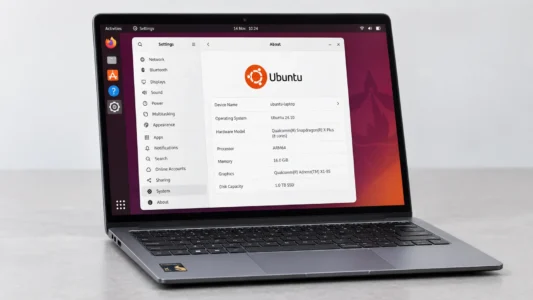
PCs powered by a Qualcomm Snapdragon X processor are becoming increasingly common. They are available from Acer, Asus, Dell, HP, Lenovo, Microsoft, and Samsung. They look like any other Windows laptop from the outside, but their ARM CPU architecture is different from the Intel and AMD PCs that have dominated the market for decades.
If you want to replace Windows 11 with Linux or install a second operating system in a dual-boot setup, downloading a Linux distribution, creating a USB drive with Rufus, and booting from it will not necessarily work on a Snapdragon X.
Windows 11 ARM is the operating system with the most complete support on these computers. Linux has nevertheless made a great deal of progress. Ubuntu now offers a genuine ARM64 Desktop image intended in particular for Windows on Arm PCs, and Fedora also provides an installation procedure for Snapdragon computers.
In this article
Snapdragon X PCs present challenges under Linux
Most PCs sold over the past twenty years have used the x86-64 architecture developed around Intel and AMD processors. Snapdragon X chips, on the other hand, use the ARM64 architecture, also known as AArch64. This architecture has long been used in smartphones, tablets, servers, and Raspberry Pi computers. Apple also made it popular on desktops and laptops with its Apple Silicon chips. Qualcomm is now trying to do the same in the Windows world with Snapdragon X.
A system compiled for x86-64 cannot simply be booted on a Snapdragon X. This is why a USB drive containing a Kubuntu AMD64 ISO may be detected by the PC firmware but still fail to start the operating system correctly.
However, the problem goes beyond the processor architecture itself. On a traditional PC, Linux can discover much of the hardware through standard PC mechanisms and drivers built into the kernel. On ARM computers, the system must also have an appropriate description of the hardware, usually provided through a Device Tree. Two computers using very similar Snapdragon chips may therefore need different files to make the display, USB ports, Wi-Fi, audio, battery, or power management work.
The existence of an ARM64 ISO is therefore not enough to conclude that a distribution is compatible with a Snapdragon X PC.
Windows 11 ARM has the best support
For a computer sold with a Snapdragon X, Windows 11 ARM is currently the reference solution. Microsoft provides a Windows 11 image directly intended for ARM64 PCs, and manufacturers provide their drivers and firmware updates for this environment.
Ubuntu is one of the most advanced Linux distributions
Ubuntu has made significant progress. It officially offers a generic ARM64 Desktop image for ACPI and EFI platforms, as well as for Windows on Arm machines equipped with Snapdragon chips. The initial Snapdragon X Elite support work was integrated directly into this official image. Canonical confirms that the ARM64 Desktop ISO is intended in particular for Snapdragon devices running Windows on Arm.
These are no longer merely experimental images created for a few developers. There is still an important distinction between platform support for Snapdragon and support for a specific computer, because some features may remain unavailable depending on the model.
Ubuntu therefore officially supports the Snapdragon X platform, but that does not mean that every computer using this processor will be fully functional from the first boot.
Fedora also supports Snapdragon X PCs
Fedora is the other major distribution that has made significant progress on these computers. Fedora introduced a mechanism that allows ARM64 images to automatically select the correct Device Tree on Windows on Arm machines, making Live images usable without manually rebuilding an ISO for every model.
Fedora provides documentation dedicated to installing Fedora Workstation AArch64 on Snapdragon Windows on Arm computers, along with specific instructions for Snapdragon X Elite and Snapdragon X Plus systems.
Support is still less straightforward than on an Intel or AMD PC. Some machines still require adjustments after installation, and model-specific firmware may need to be recovered from the original Windows installation.
Fedora also recommends keeping Windows so that you can continue receiving firmware updates supplied by the manufacturer.
Linux must identify the correct Device Tree
The processor may be supported by the Linux kernel even though the computer itself is not yet fully supported. Linux needs to know how the display, USB controller, Wi-Fi chip, speakers, various Qualcomm co-processors, battery management, and many other components are connected. This information can be supplied through a Device Tree adapted to the model.
Fedora is working to automate the selection of the correct Device Tree when its ARM64 images boot, making them easier to use on Windows on Arm PCs.
Ubuntu faces the same issue. The distribution may support the Snapdragon X platform without every computer on the market immediately having all the components required for full operation.
Most ARM64 distributions do not yet support Snapdragon X PCs
Many Linux distributions have offered ARM64 images for years, but that does not mean they can be installed on a PC with a Snapdragon X. These images were developed for other ARM platforms, such as Raspberry Pi computers, development boards, servers, or certain computers that already have hardware support.
Raspberry Pi OS is a good example. The system exists in a 64-bit version and does use the ARM64 architecture, but its documentation explains that this version is designed for Raspberry Pi computers with 64-bit processors, such as the Raspberry Pi 3, 4, and 5. An ARM64 image is tied to the hardware it knows how to boot and use.
Snapdragon X chips are much newer in the PC world. Qualcomm announced the Snapdragon X Elite in October 2023 and started integrating its support into the Linux kernel before the first commercial computers arrived. In 2024, the manufacturer was still explaining that several features, including display output, the GPU, audio, the camera, and power management, required further development.
We allow some readers to view our articles for free with an ad blocker. However, their number is currently too high for us to keep this access available to everyone.
You can disable your ad blocker to continue reading immediately, subscribe to enjoy all our content without ads, or come back a little later when the pressure has eased.
Access will be restored automatically as soon as the situation allows.